QuickBooks and Wave are two of the most accessible bookkeeping solutions in North America. However, each has different strengths, weaknesses, and use cases. To help you pick the right software for your business, we provide a detailed breakdown of each option’s pricing, plans, and features.
| Wave | QuickBooks | |
|---|---|---|
| Price | $0 per month for Starter $26 per month or $260 per year for Pro* | $30 per month for EasyStart, $70 per month for Essentials $110 per month for Plus $220 per month for Advanced |
| G2 Rating | ★★★★ 4.3 out of 5 (based on 300+ reviews) | ★★★★ 4 out of 5 (based on 3,000+ reviews) |
*Wave lists its prices exclusively in USD. The values above provide an estimated CAD conversion.
Wave Overview
| Starter | Pro |
|---|---|
| $0 | $26 per month or $260 per year |
| – Unlimited invoicing – Unlimited estimates – Unlimited bookkeeping records – Dashboards and reports | – All Starter features – Additional user seats – Discounted online payment fees – Auto-import bank transactions – Auto-merge and categorize transactions – Third-party integrations – Free receipt capture |
Wave advertises itself as a financial platform built for business owners, not accountants. It aims to make money management accessible to users with limited technical knowledge, which it achieves by designing for simplicity and clarity. Its interface uses plain language and features guided workflows to enable users to move from setup to daily use relatively quickly.
The company offers two types of plans: a free basic plan and a professional plan that costs $26 per month. The free plan includes core accounting, invoicing, and reporting. Meanwhile, the paid plan adds increased invoice customizability, automated bank imports, auto-categorization, and third-party integrations. Wave also provides add-ons, including an $11-per-month receipt capture add-on, a $55-per-month payroll add-on, and a $204-per-month hired bookkeeper.
Wave’s main selling point is accessibility. Its free plan allows businesses with smaller budgets or lower monthly revenue to manage their money without significant upfront investment. The interface is simple and easy to understand, enabling users to navigate tasks with confidence, even without a finance background. Wave also uses reporting and dashboards to turn financial data into clear, easy-to-digest visualizations, which help users understand their financial health at a glance.
Wave is best for freelancers, consultants, and small service-based businesses with straightforward finances. It is particularly suitable for users who want an easy tool without a steep learning curve. Though it may not meet the needs of larger companies or businesses with complex inventory, advanced reporting, or multi-entity structures, it is a sufficient and cost-effective financial management solution for most small operators.
QuickBooks Overview
| EasyStart | Essentials | Plus | Advanced |
|---|---|---|---|
| $30 per month | $70 per month | $110 per month | $220 per month |
| – 1 user seat, plus accountant access – Automated bookkeeping – Automatic tax deduction calculation – Automated bank feeds – Receipt capture – Mileage tracking – Estimates – Invoices – Sales and sales tax – Cash flow planning – AI-powered bank feeds – Sales Tax AI Agent | – 3 user seats, plus accountant access – All EasyStart features – Multi-currency support – Bill management – Recurring invoices – Reputation management – Lead management – Time-tracking – Basic custom roles and permissions – AI-powered collaboration | – 5 user seats, plus accountant access – All Essentials features – Project management – Inventory tracking – Customer agent | – 25 user seats, plus accountant access – All Plus features – Revenue recognition – Fixed asset tracking – Advanced business intelligence – Finance agent – Customer management agent |
QuickBooks is by far the most widely used bookkeeping platform globally. Its longstanding market domination has made it the default choice for many accountants and bookkeepers. Because so many professionals already understand the system’s ins and outs, choosing QuickBooks gives business owners more flexibility when outsourcing bookkeeping.
The platform offers several pricing tiers that align with different stages of business growth. Entry-level plans focus on the basics, such as tracking income and expenses for very small operations. Mid-tier options expand these capabilities with features like bill management and advanced reporting. Higher-tier plans, designed for growing companies and small enterprises, offer advanced tools, such as inventory tracking, project profitability, and workflow automation.
QuickBooks earned its popularity by offering deep general accounting functionality. Users can monitor income and expenses, handle bills, reconcile bank accounts, run payroll, manage inventory, and generate detailed financial reports. It also supports a large ecosystem of third-party integrations, including connections with platforms like Amazon, eBay, Shopify, and PayPal.
Aside from this broad functionality, another major advantage QuickBooks offers is its strong user base. The platform’s popularity has generated a wealth of tutorials, guides, and expert support, which helps new users get up to speed more easily. This combination of benefits makes QuickBooks a solid option for businesses needing dependable and scalable bookkeeping solutions.
Wave vs. QuickBooks Comparison
Because Wave and QuickBooks serve different target customers, they differ in many key areas. Below, we compare their plans, interfaces, core accounting features, and more.
1. Scalability
QuickBooks offers a wider range of software plans, each serving a different stage of growth. It can accommodate freelancers, small businesses, mid-sized businesses, and small enterprises. Its higher-tier plans provide access to advanced features, including inventory tracking, project profitability, and workflow automation.
In contrast, Wave primarily serves freelancers, contractors, self-employed individuals, and small businesses. It only offers two types of plans: a free plan with basic functionality and a paid plan with added customizability, automation, and integrations. It does not include features designed to support the more complex workflows typical of larger businesses.
Wave is suitable for individuals and small businesses that prioritize cost-effectiveness over depth. However, QuickBooks is the better solution for businesses that plan to expand.
2. Interface
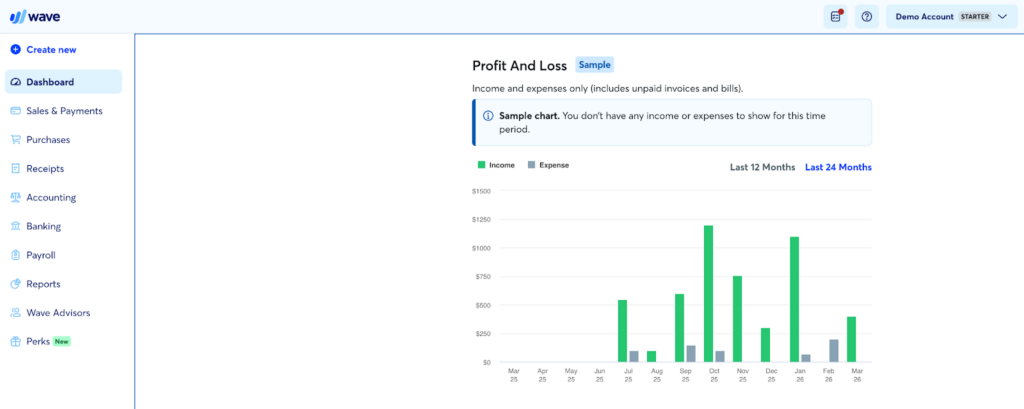
Wave provides a much more straightforward interface than QuickBooks. It places shortcuts to all core financial management workflows on an easily accessible navigation sidebar. These shortcuts include:
- Dashboard
- Sales and payments
- Purchases
- Receipts
- Accounting
- Banking
- Payroll
- Reports
- Wave Advisors
- Perks
It also comes with a utility bar on the top part of the page, with links to:
- Dashboard
- Advisor bar
- Help pop-up
- Account management
Wave’s unique Advisor bar provides tips and reminders that help users with day-to-day bookkeeping tasks. Meanwhile, the Help pop-up links out to the Help Center, the support chatbot, and Wave Advisors.
Wave’s main drawback is its lack of a search bar, a navigation feature most other bookkeeping software includes. This forces you to locate transactions, reports, and other files manually.
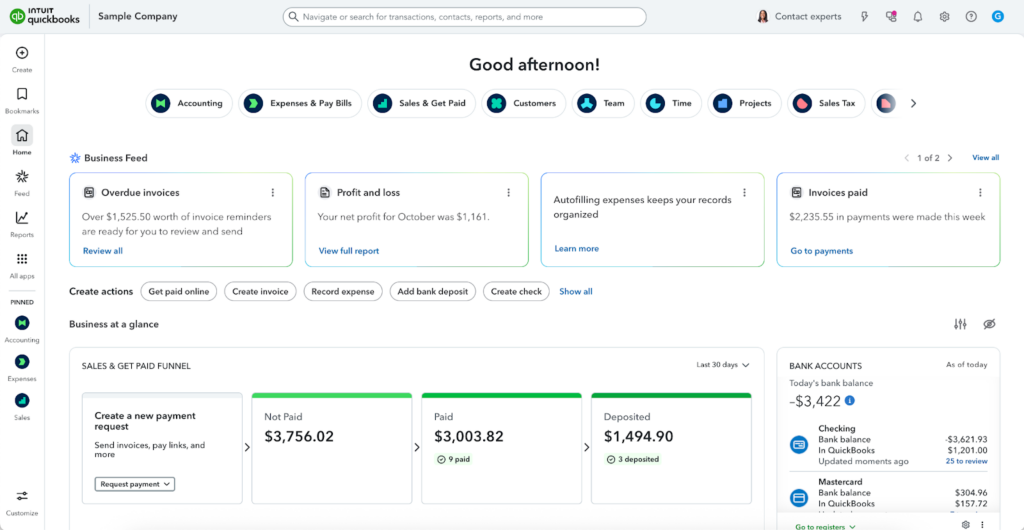
In contrast, QuickBooks has a more crowded interface, largely due to its broader feature set. It relies on customization to simplify navigation. Users must use pins and bookmarks to create shortcuts to their typical workflows.
By default, QuickBooks places all core bookkeeping workflows under the “All apps” button on the left navigation bar. These workflows include:
- Accounting
- Expenses and Bills
- Sales and Invoices
- Payroll
- Inventory
- Business Tax
- Sales Tax
Unlike Wave, QuickBooks provides a search bar, which lets you quickly find transactions, contacts, reports, and other information.
3. Payments and Invoicing
All Wave and QuickBooks plans, including Wave’s free plan, include unlimited invoices and estimates. This is generous for a free plan, as most freelancer-focused bookkeeping tools set monthly limits.
However, the Wave Free plan limits invoice customization. You can only remove Wave branding, add attachments, or create reusable invoice templates when you upgrade to Wave Pro. In contrast, all QuickBooks plans provide a high level of invoice customizability.
Both Wave and QuickBooks let you accept payments online. However, Wave Free charges a 1% fee per bank transfer and a fee of 2.9% + $0.83 per credit card transaction. Wave Pro waives the additional $0.83 surcharge. QuickBooks also charges 1% per bank transfer and approximately 2.9% + $0.25 per credit card transaction.
4. Bill Management
Although QuickBooks and Wave both support bill tracking, they differ in scope and automation. QuickBooks includes built-in accounts payable tools on all plans. You can record and track bills, monitor due dates, and view payment status in one place with the Bill Tracker. It also connects to your bank feed to help match payments automatically.
In contrast, Wave also lets you record bills and track their status. However, its accounts payable features are more limited. It relies more on manual tracking and offers fewer automation tools than QuickBooks.
5. Expense Tracking
QuickBooks and Wave both simplify expense tracking. However, the depth of their features differs. Although both give a clear view of where your money goes, QuickBooks expense tracking is better suited to businesses with larger transaction volumes, while Wave primarily accommodates simple expense tracking needs.
Wave lets you connect your bank account, categorize transactions, and attach receipts to expenses. You can also use the mobile app to scan and upload receipts, which helps keep records organized.
QuickBooks offers similar features with more advanced controls. You can track expenses by vendor, category, or project, attach receipts, split transactions, and set recurring expenses. It also reduces manual work by using automation, such as bank rules, to categorize transactions automatically.
6. Reporting
QuickBooks offers deeper reporting functionality than Wave. As a lightweight, freelancer-focused solution, Wave focuses solely on essential reports. These include:
- Financial statements: These include balance sheets, income statements, and cash flow statements.
- Tax reports: This includes sales tax reports.
- Payroll reports: This includes payroll wage and tax reports, and payroll benefits and deductions reports.
- Tag reports: This includes tag comparison reports, which compare income and expenses for specific tags within a date range.
- Customer reports: This includes income by customer, aged receivables, and customer credits.
- Vendor reports: This includes purchases by vendor and aged payables.
- Detailed reports: This includes detailed account balances, trial balances, and account transactions.
In contrast, QuickBooks provides a wider selection of report templates. These include reports for accounts receivable, inventory, sales and customers, accounts payable, expenses and vendors, sales taxes, payroll, and financial statements. It also allows you to create custom reports to display the data most relevant to your business.
7. Dashboards
QuickBooks and Wave both provide dashboards with intuitive data visualizations. However, the Wave dashboard only offers a quick snapshot of your finances, while the QuickBooks dashboard provides comprehensive reporting for deeper analysis.
Wave’s dashboard appears on the homepage and focuses on simplicity. It shows core metrics such as cash flow, profit and loss, income, expenses, and overdue invoices. While the layout is clean and easy to read, customization options are limited.
QuickBooks offers more detailed dashboards, especially on higher-tier plans. They aim to help businesses track daily activity and evaluate overall financial performance. Available insights include:
- Profit and loss
- Cash flow
- Sales by customer
- Expenses by category
- Accounts receivable and payable
- Bank balances
8. Integrations
Because it aims to serve larger businesses, QuickBooks offers a broader selection of integrations than Wave. It connects to over 1,000 applications, including payment tools Stripe, PayPal, and Square; e-commerce platforms Shopify and WooCommerce; and customer relationship management (CRM) solutions HubSpot and Salesforce.
Wave, in contrast, offers a smaller selection of integrations, which are grouped into three types: Wave Integrations, Partner Integrations, and Make Integrations:
- Wave Integrations: These are built-in integrations accessible to all Wave users. As of 2026, the only Wave Integration available is Google Sheets.
- Partner Integrations: These are integrations built by Wave’s partners. They allow users to sync data between apps. Unlike Wave Integrations, Partner Integrations are only accessible to Wave Pro users. Available Partner Integrations include Driversnote, Capsule, MinuteDock, BlueCamroo, Taxomate, Swell Scheduling, Swell Time Tracking, and Online Check Writer.
- Make Integrations: These are integrations users can connect to Wave through an app called Make. Like Partner Integrations, Make Integrations are only accessible to Wave Pro users. Available apps include Shopify, Airtable, PayPal, Stripe, Calendly, Acuity, HubSpot, Pipedrive, Harvest, MailChimp, SendPulse, Slack, Gmail, Google Calendar, and Formstack Documents.
9. Mobile App
Both Wave and QuickBooks offer mobile versions with basic bookkeeping functionality. Each app is available on the App Store and Google Play, offering the following features:
| Wave | QuickBooks | |
|---|---|---|
| View basic activity dashboards | ✅ | ✅ |
| Invoicing | ✅ | ✅ |
| Expense tracking | ✅ | ✅ |
| Mobile receipt capture | ✅ | ✅ |
| Mileage tracking | ❌ | ✅ |
| Time tracking | ❌ | ❌ |
| Online payments | ✅ | ✅ |
| Client management | ✅ | ✅ |
| Report generation | Limited | ✅ |
| Activity alerts | ✅ | ✅ |
All four apps received strong ratings on both the App Store and Google Play. However, user feedback in written reviews was more varied.
- Recent reviews from iOS users were largely positive, with many describing the app as intuitive and easy to use. However, Android reviews skew predominantly negative. Users claim that the app hides or limits multiple basic features, including login and account history management.
- QuickBooks users described the app as functional but difficult to navigate. Some negative reviews also noted that certain features stopped working properly after updates.
| App Store Rating | Google Play Rating | |
|---|---|---|
| Wave | ★★★★ 4.4 out of 5 (based on 6,000+ reviews) | ★★★★ 4.9 out of 5 (based on 23,000+ reviews) |
| Visit App Store | Visit Google Play | |
| QuickBooks | ★★★★ 4.7 out of 5 (based on 200,000+ reviews) | ★★★★ 4.4 out of 5 (based on 70,000+ reviews) |
| Visit App Store | Visit Google Play |
10. User Feedback
| Capterra Rating | G2 Rating | |
|---|---|---|
| Wave | ★★★★ 4.4 out of 5 (based on 1,000+ reviews) | ★★★★ 4.3 out of 5 (based on 300+ reviews) |
| Visit Capterra | Visit G2 | |
| QuickBooks | ★★★★ 4.3 out of 5 (based on 8,000+ reviews) | ★★★★ 4 out of 5 (based on 3,000+ reviews) |
| Visit Capterra | Visit G2 |
Both platforms scored positively on user review websites Capterra and G2. Wave scored better overall, but QuickBooks boasts a larger number of reviews. There are only 1,000 and 300 Wave reviews on Capterra and G2, respectively.
Most Wave reviews remark that the platform is cost-effective, efficient, and easy-to-use. Negative reviews primarily complained about the company’s lack of customer support channels, which prevented users from solving software issues efficiently. Some users also noted that the platform lacks third-party integrations and does not work with all banks.
Reviews for QuickBooks were similar. Satisfied users said that the platform was easy to use. Many singled out the dashboard feature for making financial data easier to understand at a glance. Like with Wave, negative QuickBooks reviews focused on customer support quality, which many found difficult to reach or unhelpful.
11. Customer Support
| Wave | QuickBooks | |
|---|---|---|
| Phone | ❌ | ✅ |
| Chatbot | ✅ | ✅ |
| Live Chat | ✅(Qualified users only) | ✅ |
| ✅(Qualified users only) | ❌ | |
| Help Center | ✅ | ✅ |
| Community Forum | ❌ | ✅ |
Wave offloads most of its support to Mave, its automated customer support chatbot, which is available to all users 24/7 via the web browser or mobile app. Users who want to speak to representatives directly can reach out via phone or request an email through Mave. However, they only qualify for direct support if they meet one or more of the following criteria:
- You have set up online payments, and your application was approved
- You are a payroll subscriber(including limited access)
- You are a Wave Pro Plan subscriber
- You are a receipt scan subscriber
- You have bookkeeping with a Wave Advisor
In contrast, QuickBooks provides support through all possible channels except email. This makes it easy for customers to reach representatives.
Both platforms come with help centers, which provide pre-written guidance on common tasks, configurations, and issues. QuickBooks also hosts a community forum. This space allows users to exchange questions, tips, and knowledge not provided through official sources.
12. Multi-user Support
Each QuickBooks plan includes a set number of user seats: 1 for EasyStart, 3 for Essentials, 5 for Plus, and 25 for Advanced. The company does not let you purchase additional seats, forcing you to stay within each plan’s limits.
In contrast, Wave’s Starter plan lets you add a tax advisor and a payroll manager at no extra cost. If you upgrade to Wave Pro, you can add unlimited users, also at no extra cost.
Both platforms provide customizable permissions. This allows you to control what other users can access and keep sensitive financial information secure.
When to Choose Wave
Wave targets freelancers, contractors, self-employed individuals, and small business owners who do their own bookkeeping. It makes up for a lack of advanced bookkeeping functionality by providing affordable pricing plans and user-friendly workflows.
You are on a budget
Wave is one of the few business bookkeeping solutions that offers a free plan. This makes it a cost-effective option for businesses that need basic bookkeeping functionality but generate lower revenue. In contrast, QuickBooks’ cheapest plan costs $30 per month.
You are a freelancer, contractor, or self-employed individual
Wave aims to accommodate service-focused independent contractors. Though it lacks support for large teams or complex transactions, it provides tools that support simple business models. Examples of tools include invoicing, expense tracking, and basic reporting.
You do your own bookkeeping
Because QuickBooks is so feature-rich, its interface can be a little more challenging to navigate compared to its competitors. This complexity can slow down onboarding or delay general workflows. In contrast, Wave aims to be accessible to users with limited financial management knowledge. It provides basic bookkeeping functionality in an easy-to-navigate interface.
When to Choose QuickBooks
Wave is the better choice if you are a freelancer or a small business on a budget. However, QuickBooks is the more popular and comprehensive solution.
You want flexibility in choosing accountants and bookkeepers
QuickBooks is an industry leader and currently the most popular bookkeeping software across the globe. In contrast, Wave only serves a small fraction of the freelancer and small business niche. This reach makes QuickBooks a better choice if you plan to outsource bookkeeping. Because many accountants and bookkeepers already use it, you can choose from a larger talent pool and onboard them more quickly.
You plan on expanding your business
Wave plans target small to mid-sized businesses. The platform keeps costs low by limiting features, including advanced reporting, integrations, and inventory tracking. QuickBooks, in contrast, supports both small businesses and larger organizations. Higher-tier plans give you access to advanced reporting and customization, strong user controls, project profitability tracking, inventory management, and full double-entry accounting.
You value access to customer service
Many reviews say that Wave’s customer service leaves much to be desired. The company relies on chatbots for most support inquiries, and only offers direct communication to select users, which can slow down issue resolution. QuickBooks, in contrast, provides support through phone and chat, which makes it easier to get help when you need it.
When to Choose an Alternative
Although Wave and QuickBooks are both strong accounting solutions, there are still a few situations where neither is suitable. Below, we discuss when it’s best to choose a different accounting software.
You are on a budget and operate outside the United States and Canada
Wave accounts are only available to businesses operating in the United States or Canada. If you want a cost-effective account that lets you operate elsewhere, consider Zoho Books. Its free account that supports invoicing, expense tracking, journal recording, bank reconciliation, and mileage tracking.
You need advanced inventory tracking, job costing, or project management features
Wave and QuickBooks aim to support general bookkeeping needs. Although they can support the essentials, they do not provide industry-specific features, such as advanced inventory management, job costing, and project management. If the industry you work for requires these accommodations, consider looking at alternatives.
Read our buyer’s guides to find a suitable solution.
- Best Bookkeeping Software for Churches
- Best Bookkeeping Software for Construction Companies
- Best Farm Bookkeeping Software
- Best Bookkeeping Software for Nonprofits
- Best Property Management Bookkeeping Software
- Best Bookkeeping Software for Restaurants
Bottom Line
The choice between Wave and QuickBooks depends primarily on your stage of business growth and your involvement in the bookkeeping process. Wave is a solid choice for freelancers, contractors, self-employed individuals, and small businesses in need of basic but cost-effective bookkeeping tools. It provides straightforward accounting functionality for free, allowing easy and accessible DIY bookkeeping.
However, QuickBooks is the better choice for businesses that plan to scale. It offers a broader span of software plans, with premium plans adding advanced bookkeeping features like inventory tracking, project profitability, and workflow automation.
QuickBooks is also a great choice for businesses that outsource bookkeeping. Because it is currently the most popular bookkeeping software worldwide, most bookkeepers know how to work with it. This gives business owners a larger pool of financial management professionals to choose from.
Start Your Financial Management Journey with EpicBooks
Working with EpicBooks can make your financial management processes simpler and more reliable. Our packages let you offload tasks like revenue tracking, tax preparation, financial reporting, payroll, budgeting, and forecasting. By leaving the manual work to our experts, you can solidify your financial foundation while freeing yourself to focus on strategy and growth.
Visit our services page to learn more.

Echo Wang is an accomplished Canadian entrepreneur and the driving force behind EpicBooks, bringing a wealth of experience and a passion for excellence to the realm of bookkeeping.
Start your financial management journey with EpicBooks
Revenue tracking, tax preparation, financial reporting, payroll, budgeting, and forecasting.