Xero and QuickBooks are two of the best bookkeeping solutions for small to mid-sized businesses. Each has its own strengths, weaknesses, and best use cases. To help you select the right solution, we take a closer look at each competitor’s pricing, plans, and features.
| Xero | QuickBooks | |
| Price | $25 per month for Starter, $55 per month for Standard, $75 per month for Premium | $30 per month for EasyStart, $70 per month for Essentials, $110 per month for Plus, $220 per month for Advanced |
| G2 Rating | ★★★★ 4.4 out of 5 (based on 1,000+ reviews) | ★★★★ 4 out of 5 (based on 3,000+ reviews) |
Xero Overview
| Starter | Standard | Premium |
|---|---|---|
| $25 per month | $55 per month | $75 per month |
| – Unlimited users – Up to 20 invoices – Up to 5 bills – Bank reconciliation – Receipt capture (via Hubdoc) – Short-term business snapshots | – All Starter features – Unlimited invoices – Unlimited bills | – All Standard features – Multi-currency support – Advanced analytics |
Xero is one of the most popular bookkeeping solutions in North America, trailing behind accounting behemoth QuickBooks. It aims to provide simple online accounting for small to mid-sized businesses, including service businesses, retailers, freelancers, and e-commerce sellers. Firms that use Xero typically value ease of use, intuitiveness, and seamless collaboration.
The company offers multiple plan tiers, which accommodate different business stages. The Starter tier, designed for very small businesses and sole proprietors, offers basic invoicing, bill payments, bank reconciliation, and cash flow snapshots. Meanwhile, the Standard tier adds unlimited invoicing and bill payment allowances, making it a great fit for growing small businesses. Finally, the Premium tier adds multi-currency support, advanced analytics, project tracking, and expense claims to accommodate established firms, businesses with global clients, and users who want deeper oversight.
All Xero plans include core bookkeeping, bank connections, and access to Xero’s app ecosystem. Users can create professional invoices, collect payments online, and track bills, expenses, and receipts with ease. Xero also uses your financial data to produce essential reports, such as financial statements, in just a few clicks.
Among Xero’s main selling points are multi-user support, intuitiveness, and comprehensive integrations. All plans come with unlimited user seats, allowing teams and advisors to work together without extra cost. Xero also provides an easy-to-navigate interface with in-app guidance to make onboarding smoother and easier. Finally, Xero connects with over 1,000 business tools, including Etsy, Stripe, PayPal, Square, and Hubdoc. This makes it easier for Xero users to integrate bookkeeping into their existing workflows.
QuickBooks Overview
| EasyStart | Essentials | Plus | Advanced |
|---|---|---|---|
| $30 per month | $70 per month | $110 per month | $220 per month |
| – 1 user seat, plus accountant access – Automated bookkeeping – Automatic tax deduction calculation – Automated bank feeds – Receipt capture – Mileage tracking – Estimates – Invoices – Sales and sales tax – Cash flow planning – AI-powered bank feeds – Sales Tax AI Agent | – 3 user seats, plus accountant access – All EasyStart features – Multi-currency support – Bill management – Recurring invoices – Reputation management – Lead management – Time-tracking – Basic custom roles and permissions – AI-powered collaboration | – 5 user seats, plus accountant access – All Essentials features – Project management – Inventory tracking – Customer agent | – 25 user seats, plus accountant access – All Plus features – Revenue recognition – Fixed asset tracking – Advanced business intelligence – Finance agent – Customer management agent |
QuickBooks is the most popular small bookkeeping solution worldwide. Because it has dominated the market for so long, it is often the default choice for most accountants and bookkeepers of small to mid-sized businesses. Many of today’s bookkeeping professionals are familiar with QuickBooks, making the software a great choice for business owners who want to outsource bookkeeping.
The company offers three pricing tiers, each tailored to different business sizes. Entry-level plans are designed for very small businesses and accommodate basic income and expense tracking needs. Meanwhile, mid-tier plans serve established small businesses by providing additional support, such as bill management and deep reporting. Finally, higher-tier plans aim to accommodate mid-sized businesses and small enterprises by offering inventory management support, project profitability, and workflow automation.
QuickBooks stands out for the depth of its accounting capabilities. It lets users track income and expenses, manage bills, reconcile bank accounts, run payroll, track inventory, and create comprehensive financial reports. Like Xero, it provides hundreds of useful app integrations, including connections with Amazon, eBay, Shopify, and PayPal.
Comprehensiveness and popularity are the platform’s biggest strengths. Its usefulness encourages widespread adoption, and the abundance of resources created due to its popularity makes it easier for new users to get started. It is an excellent choice for businesses that want a reliable bookkeeping solution that can accommodate them at any stage.
Xero vs. QuickBooks Comparison
While Xero and QuickBooks share some similarities, they differ in key areas. We break down those differences across pricing plans, interface, core accounting features, and more.
1. Scalability
Compared to Xero, QuickBooks plans serve a wider span of business stages. It can accommodate freelancers, small businesses, mid-sized businesses, and small enterprises. The price points and offerings of each of its plans reflect this scalability. Meanwhile, Xero only supports mid-sized businesses and smaller ones.
Xero supports a relatively narrow range of businesses, which limits its scalability. Its higher-tier plans introduce incremental bookkeeping enhancements rather than substantially expanding the platform’s capacity. On the other hand, each QuickBooks upgrade aims to accommodate increased complexity. It offers substantial quality of life changes, such as workflow automation, increased customization, and deeper reporting.
Xero works well for small to mid-sized businesses seeking a reliable, reasonably priced solution. However, QuickBooks is the stronger choice for businesses focused on growth.
2. Interface
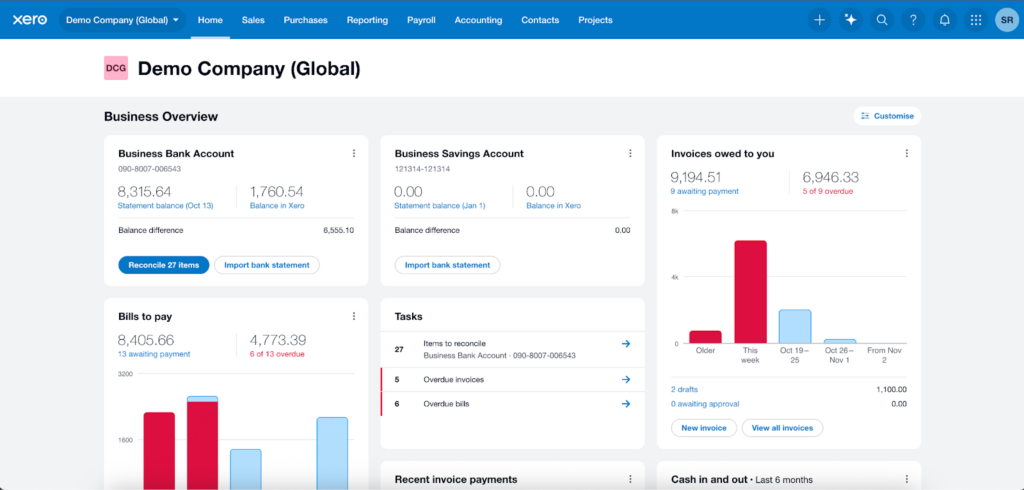
[Caption: The Xero Interface]
Between Xero and QuickBooks, Xero has a cleaner interface. The platform places links for all core bookkeeping workflows on the top navigation bar. These include:
- Home
- Sales
- Purchases
- Reporting
- Payroll
- Accounting
- Contacts
- Projects
The platform also provides easy access to the search bar, the help center, and an AI-powered support chatbot.
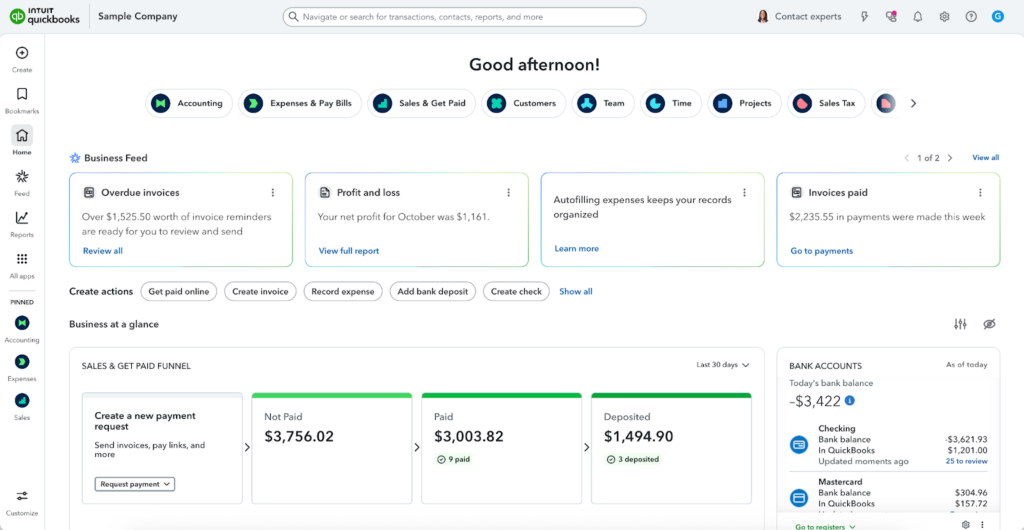
[Caption: The QuickBooks Interface]
QuickBooks, by comparison, has a busier interface, largely due to its broader feature set. To keep navigation manageable, the platform leans on customization, expecting users to create their own shortcuts using pins and bookmarks.
Without customization, QuickBooks places all core bookkeeping workflows under the “All apps” button. This includes:
- Accounting
- Expenses and Bills
- Sales and Invoices
- Payroll
- Inventory
- Business Tax
- Sales Tax
Like Xero, QuickBooks also features a search bar in the top menu, making it easy to find transactions, contacts, reports, and related information.
3. Payments and Invoicing
Xero and QuickBooks both provide effective invoicing and payment solutions. However, Xero imposes smaller allowances than QuickBooks. Its entry-level plan, Xero Starter, only allows 20 invoices per month. Users needing unlimited allowances must upgrade to higher-tier plans. Meanwhile, QuickBooks offers unlimited invoicing on all plans.
However, both plans offer similar functionality. Both offer templates that let you create professional invoices, and both can accept payments through integrated gateways and track invoice statuses in real time.
4. Bill Management
Similar to invoicing, QuickBooks’ advantage over Xero is transaction limitations. Entry-level Xero users can only enter and pay up to five bills per month. The next tier offers unlimited bill payments, but some businesses might find the $55 monthly fee too limiting. Meanwhile, QuickBooks offers unlimited invoicing on all plans.
However, both QuickBooks and Xero make it easier to track bill payment statuses. Xero integrates with your bank feed and automatically tracks payments. Dashboards give you clear visibility on unpaid, due, and overdue bills. Similarly, QuickBooks comes with a built-in Bill Tracker, which shows open, overdue, and recently paid bills in one place.
5. Expense Tracking
Both Xero and QuickBooks make it easy to track business expenses, but they approach it slightly differently. Xero lets you attach receipts, categorize spending, and link expenses directly to projects or accounts. You can also use the mobile app to snap a photo of a receipt and upload it instantly, keeping everything organized and up to date.
QuickBooks offers similar capabilities, with built-in tools to track expenses by vendor, category, or project. You can attach receipts, split transactions, and even set recurring expenses for subscriptions or regular bills. Its automation features, such as bank rules, help categorize transactions automatically, saving time and reducing errors.
Both platforms make it simple to see where your money goes, helping you manage cash flow, prepare for taxes, and make informed decisions. However, QuickBooks may feel more robust for businesses with higher transaction volumes.
6. Reporting
Xero and QuickBooks both offer in-depth reporting capabilities. Xero’s built-in report library comes with reports for financial performance, financial statements, payables and receivables, payroll, projects, reconciliations, taxes and balances, and transactions. It also lets you create custom reports that let you display your data in a way that fits your business.
Similarly, the QuickBooks library includes reports for accounts receivable, inventory, sales and customers, accounts payable, expenses and vendors, sales taxes, payroll, and financial statements. Like Xero, QuickBooks also offers custom reports. You can adjust date ranges, apply filters, and track performance in greater detail.
7. Dashboards
Both QuickBooks and Xero offer clear dashboards with easy-to-read data visualizations. This allows users to spot trends and monitor financial performance at a glance.
The Xero dashboard, located on the homepage, is extremely customizable. You can choose which metrics or widgets to display and where to position them on your interface. This allows you to place visual emphasis on the metrics that matter most.
Available Xero widgets include:
- Recent invoice payments
- Bills to pay
- Tasks
- Invoices owed to you
- Cash in and out
- Profit and loss
- Chart of accounts watchlist
- Expenses to review
- Your expenses
Meanwhile, QuickBooks dashboards are more comprehensive, especially in higher-tier plans. They display key operational insights, helping businesses track both day-to-day performance and overall financial health.
- Profit and loss
- Cash flow
- Sales by customer
- Expenses by category
- Accounts receivable and payable
- Bank balances
8. Integrations
Both QuickBooks and Xero offer extensive integration libraries. Xero connects with over 1,000 third-party apps, while QuickBooks connects with over 800. Common connections include:
- Payment tools: Stripe, PayPal, Square
- Ecommerce platforms: Shopify, WooCommerce
- CRM: HubSpot, Salesforce (availability may vary)
QuickBooks provides fewer connections because it wants users to adopt Intuit’s native tools, such as QuickBooks Time, QuickBooks Payroll, and QuickBooks Payments. Because they all originate from the same developer, the connections between these platforms are seamless, enabling smoother workflows.
However, Xero offers a greater breadth of connections. It is the better option for users who want more flexibility in choosing their stack.
9. Mobile App
Like most bookkeeping software, Xero and QuickBooks both offer mobile versions for iOS and Android. They allow you to run bookkeeping tasks remotely, but at limited capacity. Here are the tasks each offers:
| FreshBooks | QuickBooks | |
| View basic activity dashboards | ✅ | ✅ |
| Invoicing | ✅ | ✅ |
| Expense tracking | ✅ | ✅ |
| Mobile receipt capture | ✅ | ✅ |
| Mileage tracking | ✅ | ✅ |
| Time tracking | Limited | ❌ |
| Online payments | ✅ | ✅ |
| Client management | ✅ | ✅ |
| Report generation | ✅ | ✅ |
| Activity alerts | Limited | ✅ |
All four apps scored well on the App Store and on Google Play. However, written reviews were mixed.
- Xero users find the app organized and easy to use. However, a few users complained that the interface prioritized minimalism and aesthetic appeal over functionality, as some invoices omitted key details. Others claimed that the app was glitchy and unreliable.
- QuickBooks users found the app powerful but difficult to navigate. Negative reviews claimed that the app would lose some functionality after updates.
| App Store Rating | Google Play Rating | |
| Xero | ★★★★ 4.7 out of 5 (based on 400+ reviews) | ★★★★ 4.0 out of 5 (based on 10,000+ reviews) |
| Visit App Store | Visit Google Play | |
| QuickBooks | ★★★★ 4.7 out of 5 (based on 200,000+ reviews) | ★★★★ 4.4 out of 5 (based on 70,000+ reviews) |
| Visit App Store | Visit Google Play |
10. User Feedback
| Capterra Rating | G2 Rating | |
| Xero | ★★★★ 4.4 out of 5 (based on 3,000+ reviews) | ★★★★ 4.4 out of 5 (based on 1,000+ reviews) |
| Visit Capterra | Visit G2 | |
| QuickBooks | ★★★★ 4.3 out of 5 (based on 8,000+ reviews) | ★★★★ 4 out of 5 (based on 3,000+ reviews) |
| Visit Capterra | Visit G2 |
User feedback for both Xero and QuickBooks is predominantly positive across review platforms. While Xero achieved slightly higher ratings, QuickBooks recorded a greater number of reviews. For instance, Xero only attracted 3,000 reviewers on Capterra and 1,000 reviewers on G2, while QuickBooks earned 8,000 and 3,000, respectively.
Positive reviews of Xero emphasize its well-organized interface and ease of use, particularly among beginner users with limited technical knowledge. Additionally, users commend the platform for its accessibility across multiple channels, such as web and mobile.
QuickBooks received similar praise. Users found the platform straightforward, easy to use, and comprehensive. They also commended its dashboards for making financial data easy to understand.
Negative feedback for both solutions largely centers on customer support. Xero users highlight a lack of support channels, while QuickBooks users report inconsistent support quality. Some complained that support teams were difficult to reach and often unhelpful.
QuickBooks also received negative feedback for its pricing. Many users found the product too expensive, claiming that returns diminished after price increases.
11. Customer Support
| Xero | QuickBooks | |
| Phone | ❌ | ✅ |
| Live Chat | ❌ | ✅ |
| ✅ | ❌ | |
| Help Center | ✅ | ✅ |
| Community Forum | ✅ | ✅ |
One of Xero’s biggest weaknesses is its lack of live customer support channels. You can only reach Xero representatives via email, which can be a major downside when you have urgent concerns. Meanwhile, QuickBooks provides support via phone and live chat, but not email. This gives you access to support much faster.
However, both platforms also provide help centers and community forums. Help centers provide pre-written resources that guide you through common tasks, settings, and problems. Meanwhile, community forums let you participate in discussions with fellow users. This gives you access to customized tips that official sources may not provide.
12. Multi-User Support
Xero is the better solution for businesses in need of multi-user support. All plans provide unlimited user seats with no extra cost. You can customize permissions per user to control access levels and protect sensitive information.
Meanwhile, QuickBooks is much less flexible when it comes to allowing multiple users. Each QuickBooks plan comes with a fixed number of user seats, which forces you to choose between keeping your team small or upgrading plans when your bookkeeping team grows.
However, QuickBooks’ advantage over Xero is the granularity of permissions. It offers 12 user roles, letting you carefully control access to bookkeeping, accounts receivable and payable, sales, inventory, expenses, payroll, and other key areas.
In contrast, Xero only offers five distinct user roles. These dictate access to bank information, invoicing, bills, reports, platform settings, timesheets, and more.
When to Choose Xero
Xero provides great value for money for small to mid-sized businesses. It is especially useful for businesses that work with large teams for bookkeeping processes.
You are a small- to mid-sized business on a budget
QuickBooks’ higher-tier plans cost $70 per month, $110 per month, and $220 per month, respectively, which may not be accessible to the average small business. Meanwhile, Xero’s mid-tier plan offers unlimited bills, invoices, and user seats for just $55. Its only disadvantage against QuickBooks is a lack of multi-currency support and decreased scalability.
You want simple and intuitive bookkeeping
The Xero interface is easier to navigate than QuickBooks. Its top navigation bar links directly to all essential bookkeeping workflows, including sales, purchases, reports, payroll, and accounting. QuickBooks, by contrast, offers a more comprehensive set of features but leaves users to organize their own navigation experience through flexible customization.
Your business relies on collaboration
QuickBooks plans each come with fixed user limits. It does not let you buy additional user seats, which means that expanding your bookkeeping team requires upgrading to a higher plan. Meanwhile, Xero offers unlimited user seats on all plans. You can customize access levels per user to keep sensitive information secure.
When to Choose QuickBooks
While Xero is a serviceable solution, returns diminish on the highest-tier plan. QuickBooks offers more power and flexibility at higher tiers, making it a great choice for businesses with long-term growth plans.
You want flexibility in choosing accountants and bookkeepers
Xero’s popularity pales in comparison to QuickBooks, which is currently the most widely-used bookkeeping software worldwide. Because QuickBooks is so popular, most accountants and bookkeepers are familiar with it. If you plan to hire bookkeeping professionals, will have an easier time finding QuickBooks experts than Xero experts, especially if you have specialized needs.
You plan to expand
Xero plans only serve small to mid-sized businesses, and no larger. In comparison, QuickBooks also serves small enterprises. Its premium accounts come with advanced features, such as advanced reporting and customization, enterprise-grade user controls, project profitability tracking, inventory tracking, and robust double-entry accounting.
You value access to customer service
Customer support availability is one of Xero’s weakest points. It does not offer phone or live chat support, which can be a major drawback for business owners who value live communication. Meanwhile, QuickBooks offers support via phone, chat, and live chat.
When to Choose an Alternative
Although QuickBooks and Xero are both useful bookkeeping solutions, there are a handful of solutions that neither can accommodate. Freelancers and other types of solopreneurs may find them inaccessible, while enterprises may find them too limiting.
You are on a tight budget
QuickBooks plans start at $30, while Xero plans start at $25, which new business owners may find inaccessible. A more affordable alternative is Zoho Books, which provides invoicing, expense tracking, and basic accounting for free.
You are a freelancer, contractor, solopreneur, or self-employed individual
Neither Xero nor QuickBooks offers strong plans for freelancers. Xero Starter charges $25 and only provides 20 invoices and 5 bills per month. Meanwhile, QuickBooks EasyStart charges $30, which many freelancers may find inaccessible. A great freelancer-focused alternative is FreshBooks Lite, which charges $22 per month and comes with unlimited invoicing to 5 billable clients, free time-tracking, and free mileage tracking.
You need advanced inventory tracking, job costing, or project management features
Both Xero and QuickBooks are designed for general bookkeeping. While they can accommodate essential small business needs, they lack industry-specific features. If your industry requires features like these, you should consider looking at alternatives.
To find the right solution, check out our industry-specific buyer’s guides.
- Best Bookkeeping Software for Churches
- Best Bookkeeping Software for Construction Companies
- Best Farm Bookkeeping Software
- Best Bookkeeping Software for Nonprofits
- Best Property Management Bookkeeping Software
- Best Bookkeeping Software for Restaurants
Bottom Line
With generous allowances and user seats, the Xero Standard is a strong option for small to mid-sized businesses. However, its other plans do not provide the same value for money for their target markets. The Starter plan is too limiting while being too expensive, while the Premium plan does not offer enough benefits to justify its price.
If you plan to grow your business, it’s worth switching to QuickBooks. The company’s higher-tier plans offer great features for growing businesses, including advanced reporting and customization, enterprise-grade user controls, project profitability tracking, inventory tracking, and robust double-entry accounting. These additional features can accommodate the increasing complexity of your business activity as you scale.
Start Your Financial Management Journey with EpicBooks
Work with EpicBooks for a simpler, more reliable approach to financial management. Our team supports your business with revenue tracking, tax preparation, financial reporting, payroll, budgeting, and forecasting. We take care of the details so you can spend more time growing your business. Visit our services page to learn more.

Echo Wang is an accomplished Canadian entrepreneur and the driving force behind EpicBooks, bringing a wealth of experience and a passion for excellence to the realm of bookkeeping.
Start your financial management journey with EpicBooks
Revenue tracking, tax preparation, financial reporting, payroll, budgeting, and forecasting — handled.