
FreshBooks is a great solution for service-focused freelancers, solopreneurs, contractors, and self-employed individuals with low-to-moderate transaction activity and tight budgets. Meanwhile, QuickBooks suits small to mid-sized businesses that need scalable bookkeeping solutions.
The right bookkeeping software can streamline your workflow and deepen your financial insights. To help you find the best fit, we examine the pricing, plans, and features of popular solutions, FreshBooks and QuickBooks.
| FreshBooks | QuickBooks | |
| Price | $22 per month for Lite, $35 per month for Plus, $60 per month for Premium, Custom pricing for Select | $30 per month for EasyStart, $70 per month for Essentials, $110 per month for Plus, $220 per month for Advanced |
| G2 Rating | ★★★★ 4.5 out of 5 (based on 900+ reviews) | ★★★★ 4 out of 5 (based on 3,000+ reviews) |
FreshBooks Overview
| Lite | Plus | Premium | Select |
|---|---|---|---|
| $22 per month | $35 per month | $60 per month | Custom |
| – 5 billable clients – Unlimited estimates – Unlimited custom invoices – Unlimited time-tracking – Mileage tracking – Tax-time reports – Business health reports – Performance – dashboards | – All Lite features – 50 billable clients – Unlimited proposals – Double-entry accounting reports – Advanced accounting – Accountant access – Expense receipt capture | – All Plus features – Unlimited billable clients – Bill receipt capture – Project profitability reports – Accounts payable | – All Premium features – Up to 2 team member accounts – Select support – Custom onboarding services – Data migration services |
FreshBooks is one of the most popular small business bookkeeping solutions. While it does not match QuickBooks in total market share, it holds a strong position in its target market of freelancers, solopreneurs, and very small teams. Service-focused businesses choose FreshBooks because it focuses on billing clients, tracking time, and getting paid faster.
The company offers tiered pricing plans based on the number of billable clients your business serves. Entry-level plans suit freelancers who invoice a small client list and want basic expense tracking. Mid-tier plans support growing businesses that need recurring invoices, time tracking, and project features. Higher-tier plans work best for small teams that need collaboration, advanced reporting, and multiple users.
FreshBooks handles core bookkeeping tasks with ease. Users can create and send professional invoices, accept online payments, track expenses, log billable time, and generate financial reports. While it does not offer deep inventory or complex tax features, it covers the essentials well for service-based work.
One of the platform’s biggest selling points is its ease of use. Setup takes little time, and features are easy to navigate. The intuitive interface allows users to manage their books without outside help. This makes it an effective solution for business owners who do their own bookkeeping but have limited technical experience.
QuickBooks Overview
| EasyStart | Essentials | Plus | Advanced |
|---|---|---|---|
| $30 per month | $70 per month | $110 per month | $220 per month |
| – 1 user seat, plus accountant access – Automated bookkeeping – Automatic tax deduction calculation – Automated bank feeds – Receipt capture – Mileage tracking – EstimatesInvoices – Sales and sales tax – Cash flow planning – AI-powered bank feeds – Sales Tax AI Agent | – 3 user seats, plus accountant access – All EasyStart features – Multi-currency support – Bill management – Recurring invoices – Reputation management – Lead management – Time-tracking – Basic custom roles and permissions – AI-powered collaboration | – 5 user seats, plus accountant access – All Essentials features – Project management – Inventory tracking – Customer agent | – 25 user seats, plus accountant access – All Plus features – Revenue recognition – Fixed asset tracking – Advanced business intelligence – Finance agent – Customer management agent |
QuickBooks is by far the most popular bookkeeping solution among small businesses worldwide. Its long history and broad feature set make it a default choice for many accountants and bookkeepers, particularly its target market of small to mid-sized businesses. Because it is so popular, many accountants are familiar with it, making it a great choice for businesses that want to outsource bookkeeping.
The company offers several pricing plans designed for different stages of growth. Entry-level plans support basic income and expense tracking for very small businesses. Mid-tier plans add features like bill management and deep reporting. Higher-tier plans support inventory and project profitability. Each plan aims to support more complexity as a business expands.
The software delivers a wide range of accounting capabilities. Users can track income and expenses, manage bills, reconcile bank accounts, run payroll, track inventory, and generate detailed financial reports. The platform also supports sales tax tracking and integrates with hundreds of third-party apps. These tools give business owners a full view of their finances.
QuickBooks stands out for its depth and flexibility. With strong reporting, widespread accountant support, and powerful integrations, it’s a great solution for businesses that want robust control and support for future growth.
When to Choose FreshBooks
FreshBooks is a better choice for QuickBooks if you need basic services at an affordable price. It offers all necessary bookkeeping tools with a clean interface and small business-focused pricing plans.
You are on a budget
QuickBooks plans start at $30 per month, and the price hikes between tiers are pretty steep. In contrast, FreshBooks plans start at $22, and its most expensive plan is still cheaper than QuickBooks’ mid-tier plan ($60 for FreshBooks Premium and $70 for QuickBooks Essentials). These costs are more budget-friendly while providing the same fundamentals.
You want a beginner-friendly system
FreshBooks provides a much more intuitive interface than QuickBooks. Because QuickBooks offers a wider range of features, its interface is a little more complex. This can slow onboarding, especially if you are doing your own bookkeeping and have limited technical experience. Meanwhile, FreshBooks offers easy navigation, with shortcuts for all core workflows on the sidebar.
You are a freelancer, contractor, or self-employed individual
Overall, FreshBooks’ features, pricing, and interface are better suited for freelancers and other types of solopreneurs compared to QuickBooks. It sufficiently accommodates the typical freelancer’s bookkeeping needs while keeping costs accessible. In comparison, QuickBooks is better suited for small businesses. It offers a comprehensive set of accounting capabilities that many freelancers don’t need and may end up paying additional fees for.
When to Choose QuickBooks
Overall, QuickBooks is the better choice for larger businesses needing premium features and support for future growth. FreshBooks, while cheaper, only accommodates small businesses with basic needs.
You want flexibility in choosing accountants and bookkeepers
QuickBooks is a much more popular bookkeeping solution than FreshBooks. If you intend to outsource bookkeeping, you will have an easier time finding QuickBooks specialists than FreshBooks specialists. While FreshBooks is easy to learn, QuickBooks is the better choice if you want more flexibility when choosing accountants or bookkeepers.
You’re planning to expand
Compared to FreshBooks, QuickBooks plans cover a wider range of businesses.
While FreshBooks plans primarily accommodate solopreneurs and small businesses, QuickBooks plans also cover mid-sized businesses and small enterprises. It offers premium features, such as advanced reporting and customization, enterprise-grade user controls, project profitability tracking, inventory tracking, and robust double-entry accounting.
You have international transactions
FreshBooks does not provide multi-currency support, which is included in QuickBooks Plus and Advanced. QuickBooks’ multi-currency support allows you to track transactions in foreign currencies while keeping your books in your home currency. The software automatically calculates exchange rate conversions to record gains and losses caused by currency fluctuations.
When to Choose an Alternative
While both FreshBooks and QuickBooks are solid bookkeeping tools, there are a few cases where alternatives work better.
You are on a very tight budget only need simple invoicing and estimates
The cheapest FreshBooks plan charges $22, which may still be inaccessible to new businesses, especially if you only need very basic bookkeeping services. The best bookkeeping solution in this situation is Zoho Books, which offers a free plan for small businesses, covering invoicing, expense tracking, and basic accounting.
You work with a large team
Both FreshBooks and QuickBooks limit support for multi-user teams. With FreshBooks, the problem is cost: the platform charges an additional $13 per month for each additional user. Meanwhile, the issue with QuickBooks is inflexibility. The company assigns specific user seat limits to each plan: one for EasyStart, three for Essentials, five for Plus, and twenty-five for Advanced. Because QuickBooks does not let you buy additional user seats, you must choose a plan that matches your team size.
The best bookkeeping solution for large teams is Xero. All Xero plans include unlimited user seats with highly customizable permissions. This allows you to distribute bookkeeping responsibilities without sacrificing cost-effectiveness or security.
You need advanced inventory tracking, job costing, or project management features
FreshBooks and QuickBooks both offer generalized bookkeeping solutions. They’re great at accommodating small to mid-sized businesses, but fall short when it comes to industry-specific needs. If you need specialized features like advanced inventory, in-depth job costing, or full project management, you’re better off considering alternatives.
Our industry-specific buyer’s guides can help you find a solution that can accommodate your needs.
- Best Bookkeeping Software for Churches
- Best Bookkeeping Software for Construction Companies
- Best Farm Bookkeeping Software
- Best Bookkeeping Software for Nonprofits
- Best Property Management Bookkeeping Software
- Best Bookkeeping Software for Restaurants
FreshBooks vs QuickBooks in Depth
FreshBooks and QuickBooks have some overlap, but they’re built for different needs. We compare their plans, interface, core accounting features, and more.
Scalability
FreshBooks and QuickBooks target different business levels. FreshBooks focuses on solopreneurs and small businesses, offering pricing plans suited to that scale. QuickBooks supports a wider range of businesses, from small startups to larger companies.
For this reason, the differences between FreshBooks plans are much smaller than the differences between QuickBooks plans. Each FreshBooks tier adds a few extra features, and keeps price jumps between tiers relatively small. QuickBooks plans, by contrast, include more substantial feature upgrades, and the cost rises more noticeably between tiers.
If you don’t plan to expand past the small business stage, FreshBooks is the better option. It keeps pricing accessible while improving upon the fundamentals with each tier. However, if you have bigger plans for growth, QuickBooks would be better at accommodating your needs. Each upgrade grants access to extremely useful features, including bill management, profitability tracking, support for larger workflows, and premium customer support.
Interface
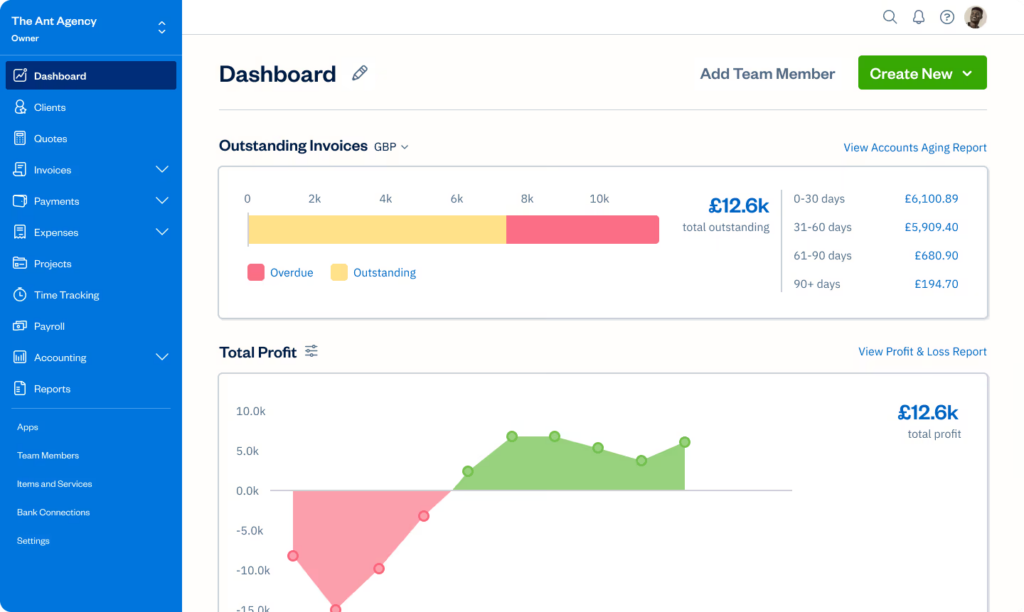
Because FreshBooks offers fewer features than QuickBooks, the platform is much easier to navigate. It provides a navigation sidebar for easy navigation, its buttons granting fast access to all relevant bookflows. This includes:
- Dashboard
- Clients
- Estimates
- Invoices
- Payments
- Expenses
- Projects
- Time-Tracking
- Accounting
- Reports
The interface also includes a search bar that helps you quickly find clients, payments, and expenses. A help center shortcut sits in the bottom-right corner, so support is always close at hand.
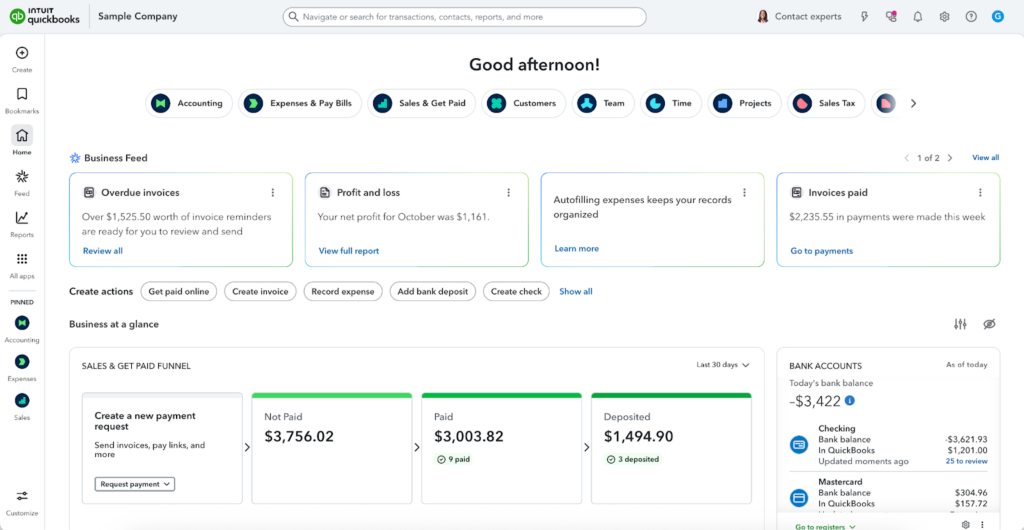
In contrast, the QuickBooks interface feels more complex, specifically because the platform offers a wide range of features. To manage this breadth, QuickBooks relies on customization, placing the responsibility of easy navigation on the user. Users must take advantage of pins and bookmarks to reach the workflows they use most often.
By default, all core bookkeeping workflows are located under the “All apps” button. This includes:
- Accounting
- Expenses and Bills
- Sales and Invoices
- Payroll
- Inventory
- Business Tax
- Sales Tax
Like FreshBooks, QuickBooks provides a search bar for easier navigation. It is located on the top menu bar and allows you to search specific transactions, contacts, reports, and more.
Payments and Invoicing
While both FreshBooks and QuickBooks let you send invoices online, QuickBooks has the edge over FreshBooks. FreshBooks’ lower-tier plans limit the number of clients you can send invoices to. FreshBooks Lite allows you up to five clients at a time, while FreshBooks Plus allows 50 clients at a time.
While these allowances may suffice for freelancers or very small businesses, larger businesses may find them overly restrictive. QuickBooks, on the other hand, does not impose client limits for invoicing.
However, both platforms are similar in terms of functionality. They both let users track payment statuses and request reminders for unpaid invoices, minimizing the risk of missed payments.
Expense Tracking
FreshBooks and QuickBooks are pretty even when it comes to expense tracking. Both platforms let you connect to your bank and credit card accounts and automatically record transaction activity.
FreshBooks focuses on simple, client-friendly expense categorization. You record expenses, attach receipts, and assign them to categories that match your business. You can also mark expenses as billable and link them to a client or project. The platform then adds those costs to invoices automatically, which helps you recover every billable expense with little extra work.
QuickBooks takes a similar approach. It displays expenses in a table where you can review transactions, assign categories, and edit details as needed. The system can also suggest categories based on past activity. This added automation supports more detailed bookkeeping but requires closer oversight.
Time Tracking
One big advantage FreshBooks has over QuickBooks is that it offers built-in time-tracking. The platform allows you to track time for both clients and individual projects, making it simple to capture every billable hour. You can either enter hours manually or start a timer while you work, and then link these time entries directly to invoices to ensure all billable hours are accounted for.
The system also lets you analyze time by project or client, helping you monitor productivity and generate precise billing reports. You can mark entries as billable or non-billable, then add them to invoices with just a few clicks. Detailed reports provide insight into how you spent your time, making it easier to plan workloads and set project rates accurately.
In contrast, QuickBooks time-tracking requires a separate add-on, QuickBooks Time, which costs an additional $10 per user per month. While the tool adds in time tracking, including employee time tracking with payroll calculations, and project time-tracking, businesses with simpler time-tracking needs may find the price point inaccessible.
Reporting
When it comes to reporting, QuickBooks has the edge over FreshBooks. It covers a wider range of report types, including financial statements, accounts receivable reports, inventory reports, sales and customer reports, accounts payable reports, expense and vendor reports, sales tax reports, and payroll reports.
You can also create custom versions of standard reports to tailor data to your business needs. This option lets you adjust date ranges, apply filters, and track performance in greater detail.
Meanwhile, FreshBooks only offers a handful of basic reports, including financial statements, invoice and expense reports, payment reports, and time tracking and project reports. The platform does not provide report customization capabilities, limiting you to pre-built layouts.
Dashboards
QuickBooks offers better and more comprehensive dashboard capabilities than FreshBooks. However, this doesn’t mean that FreshBooks dashboards aren’t serviceable. Rather, the platform provides the right amount of functionality for its target audience. It provides simple and easy-to-read overviews of business activity, which are ideal for solopreneurs and small teams who want to glean progress at a glance.
FreshBooks dashboards show:
- Outstanding and overdue invoices
- Revenue vs. expenses
- Basic profit trends
Meanwhile, QuickBooks dashboards are more comprehensive and customizable, especially in higher-tier plans. They display key metrics, such as:
- Profit and loss
- Cash flow
- Sales by customer
- Expenses by category
- Accounts receivable and payable
- Bank balances
You can filter, drill down, and adjust reports directly from the dashboard to explore the data behind each metric. In contrast with FreshBooks, which focuses on simplicity and quick insights, QuickBooks is effective for businesses that need detailed reporting.
Integrations
QuickBooks also has the advantage in the integrations department. While FreshBooks offers built-in connections with over 100 business tools, QuickBooks connects with over 800. FreshBooks’ connections are more niche, while QuickBooks’ connections include extremely popular platforms like Amazon, eBay, Shopify, and PayPal. This means that it is much easier to connect your existing workflows to QuickBooks compared to FreshBooks.
FreshBooks also lets you connect to any app of your choice through its API. However, this process usually requires significant technical knowledge.
Mobile App
Both FreshBooks and QuickBooks come in iOS and Android versions, allowing users to run basic bookkeeping tasks on the go. Available tasks include:
| FreshBooks | QuickBooks | |
| View basic activity dashboards | ✅ | ✅ |
| Invoicing | ✅ | ✅ |
| Expense tracking | ✅ | ✅ |
| Mobile receipt capture | ✅ | ✅ |
| Mileage tracking | ✅ | ✅ |
| Time tracking | ✅ | ❌ |
| Online payments | ✅ | ✅ |
| Client management | ✅ | ✅ |
| Report generation | ✅ | ✅ |
| Activity alerts | ✅ | ✅ |
All apps received great ratings on the App Store and Google Play. However, multiple users left negative reviews. FreshBooks users complain that the app is often unreliable and that customer support is slow to address concerns. Meanwhile, QuickBooks users find the app slow and difficult to navigate. Some also claimed that the app loses functionality after phone upgrades.
However, note that users with negative experiences are more likely to leave reviews than users with positive experiences. Overall, positive ratings still outnumber negative ratings, despite the overrepresentation of criticism in written reviews.
| App Store Rating | Google Play Rating | |
| FreshBooks | ★★★★ 4.7 out of 5 (based on 11,000+ reviews) | ★★★★ 4.5 out of 5 (based on 5,000+ reviews) |
| Visit App Store | Visit Google Play | |
| QuickBooks | ★★★★ 4.7 out of 5 (based on 200,000+ reviews) | ★★★★ 4.4 out of 5 (based on 70,000+ reviews) |
| Visit App Store | Visit Google Play |
User Feedback
| Capterra Rating | G2 Rating | |
| FreshBooks | ★★★★ 4.5 out of 5 (based on 4,000+ reviews) | ★★★★ 4.5 out of 5 (based on 900+ reviews) |
| Visit Capterra | Visit G2 | |
| QuickBooks | ★★★★ 4.3 out of 5 (based on 8,000+ reviews) | ★★★★ 4 out of 5 (based on 3,000+ reviews) |
| Visit Capterra | Visit G2 |
FreshBooks and QuickBooks are both well-rated on user review websites. FreshBooks earned marginally higher average star ratings, though it hit a significantly smaller number of reviewers. In comparison, QuickBooks has over 8,000 reviews on Capterra and 3,000 ratings on G2.
Users praise both platforms for their ease of use. QuickBooks stands out for its comprehensive feature set, whereas FreshBooks is valued for its invoicing and time-tracking capabilities. Many FreshBooks users also report that it helps them save time on generating reports.
Complaints for each platform are also similar. Most negative reviews come from users who find the platforms too expensive for the value they provide.
Outside pricing, FreshBooks users complained about scalability, while QuickBooks users complained about platform reliability. FreshBooks users claim that the plans scale poorly and fail to accommodate larger operations. Meanwhile, QuickBooks users criticized the platform for being prone to lag.
Customer Support
| FreshBooks | QuickBooks | |
| Phone | ✅ | ✅ |
| Live Chat | ✅ | ✅ |
| ✅ | ❌ | |
| Chatbot | ✅ | ✅ |
| Help Center | ✅ | ✅ |
| Community Forum | ❌ | ✅ |
FreshBooks and QuickBooks offer similar customer support services. Both are reachable via phone, live chat, and help center. Both also provide help centers, which consist of step-by-step guides, tutorials, and answers to frequently asked questions.
However, unlike FreshBooks, QuickBooks does not provide email support. This may be a drawback for users who prefer having a written record of their inquiries, want to explain complex issues in detail, or prefer not to wait on live chat or phone calls. FreshBooks email support, in contrast, allows asynchronous communication, giving users the flexibility to send questions at any time and receive responses without being tied to support hours.
The one edge QuickBooks has over FreshBooks is its community forum. This platform allows users to connect with a large network of fellow QuickBooks users, share experiences, ask questions, and find solutions to common issues. Unlike traditional support channels, this peer-to-peer community provides tips and workarounds that official documentation may not cover.
Multi-User Support
FreshBooks offers flexible multi-user support. The platform charges $11 per additional user, allowing businesses to add team members without changing plans. It gives owners strong control over software access by providing seven distinct user roles, which define access to dashboards, clients, estimates, invoices, payments, expenses, projects, time-tracking, and payroll. This granular level of customizability makes it easy to involve employees, contractors, or accountants while protecting sensitive data.
QuickBooks takes a different approach. Each plan includes a fixed number of users, and you cannot purchase extra user seats. If your team grows, you must upgrade to a higher plan to add more users. However, like FreshBooks, QuickBooks provides robust permissions, with 12 different user roles. These define access to areas like bookkeeping records, accounts receivable, accounts payable, sales, inventory, expenses, payroll, and more.
Bottom Line
The choice between FreshBooks and QuickBooks is a matter of size, budget, and scalability. FreshBooks aims to serve small businesses, providing modest features and allowances at an accessible cost. Meanwhile, QuickBooks is built for businesses that intend to scale. Its tiered plans start with basic features, but add significant new upgrades for every tier, building a strong business bookkeeping foundation for growing businesses.
Start Your Financial Management Journey with EpicBooks
Partner with EpicBooks to ensure a smooth financial management journey. Our experts help you manage the complexities of business bookkeeping by managing tasks like revenue tracking, tax preparation, financial reporting, payroll management, budgeting, and forecasting. Let us handle the busywork so you can focus on your business. Check out our services page to learn more.

Echo Wang is an accomplished Canadian entrepreneur and the driving force behind EpicBooks, bringing a wealth of experience and a passion for excellence to the realm of bookkeeping.
Start your financial management journey with EpicBooks
Revenue tracking, tax preparation, financial reporting, payroll, budgeting, and forecasting.