FreshBooks and Xero are two of the best accounting solutions for small businesses. They both offer essential bookkeeping tools with straightforward interfaces and scalable pricing plans. To help you choose which suits your business better, we narrow down each solution’s plans, features, selling points, and best use cases.
| FreshBooks | Xero | |
| Price | – $22 per month for Lite, – $35 per month for Plus, – $60 per month for Premium, – Custom pricing for Select | – $25 per month for Starter, – $55 per month for Standard, – $75 per month for Premium |
| G2 Rating | ★★★★ 4.5 out of 5 (based on 900+ reviews) | ★★★★ 4.4 out of 5 (based on 1,000+ reviews) |
FreshBooks Overview
| Lite | Plus | Premium | Select |
|---|---|---|---|
| $22 per month | $35 per month | $60 per month | Custom |
| – 5 billable clients – Unlimited estimates – Unlimited custom invoices – Unlimited time-tracking – Mileage tracking – Tax-time reports – Business health reports – Performance dashboards | – All Lite features – 50 billable clients – Unlimited proposals – Double-entry accounting reports – Advanced accounting – Accountant access – Expense receipt capture | – All Plus features – Unlimited billable clients – Bill receipt capture – Project profitability reports – Accounts payable | – All Premium features – Up to 2 team member accounts – Select support – Custom onboarding services – Data migration services |
FreshBooks is a small business bookkeeping solution that aims to accommodate the needs of freelancers, self-employed individuals, contractors, and other service-focused small businesses. Its features focus on the needs of service-based workers, such as client invoicing, payments, and time-tracking.
The company offers tiered pricing based on the number of billable clients your business serves. Its entry-level plan offers basic expense tracking to freelancers with a few clients. Mid-tier plans add features like recurring invoices, time tracking, and project management to improve support for growing businesses. Its highest-tier plan provides hands-on support for data migration and onboarding.
FreshBooks handles essential bookkeeping tasks efficiently. Users can create and send professional invoices, accept online payments, track expenses, log billable hours, and generate financial reports. While it lacks advanced inventory management or complex tax tools, it covers the core needs of service-based businesses effectively.
The biggest benefit FreshBooks offers is ease of use. With its intuitive interface and wide range of support channels, it is easy to set up an account and begin working. Because the platform is so easy to navigate, it allows business owners to manage their books independently, even with limited experience or outside help.
Xero Overview
| Starter | Standard | Premium |
|---|---|---|
| $25 per month | $55 per month | $75 per month |
| Unlimited usersUp to 20 invoicesUp to 5 billsBank reconciliationReceipt capture (via Hubdoc)Short-term business snapshots | All Starter featuresUnlimited invoicesUnlimited bills | All Standard features Multi-currency supportAdvanced analytics |
Xero is accounting software built for small to mid-sized businesses, including service providers, retailers, freelancers, and e-commerce sellers. It provides basic bookkeeping tools, intuitive navigation, and supports seamless collaboration, making it a popular choice for business owners with large teams.
Xero offers three-tiered plans. The Starter plan is designed for sole proprietors and very small businesses, providing basic invoicing, bill payments, bank reconciliation, and cash flow snapshots. The Standard plan adds unlimited invoicing and bill payments, making it ideal for growing small businesses. Finally, the Premium plan includes multi-currency support, advanced analytics, project tracking, and expense claims, catering to established businesses, firms with global clients, and users who need deeper financial oversight.
All Xero plans cover core bookkeeping, bank connections, and access to Xero’s app ecosystem. Users can create professional invoices, accept online payments, and track bills, expenses, and receipts efficiently. The platform also generates essential reports, like financial statements, in just a few clicks.
Xero’s key strengths include multi-user support, an intuitive interface, and extensive integrations. All plans allow unlimited users, letting teams and advisors collaborate without additional cost. The interface is easy to navigate and offers in-app guidance for smooth onboarding. Xero also connects with over 1,000 business tools, including Etsy, Stripe, PayPal, Square, and Hubdoc, so you can integrate bookkeeping seamlessly into existing workflows.
FreshBooks vs. Xero Comparison
While FreshBooks and Xero have similarities, they serve different types of businesses. These lead to differences in interface design, features, and more.
Scalability
FreshBooks is designed to support freelancers and very small, service-based businesses. Its plans scale mainly by increasing the number of billable clients and adding collaboration features. However, the platform lacks advanced tools needed for larger operations. As a result, businesses may outgrow FreshBooks as transaction volume, team size, or reporting needs increase.
In contrast, Xero aims to accommodate small to mid-sized businesses. All plans include unlimited user seats, then introduce increased transaction allowances and more advanced accounting tools with every upgrade. These capabilities allow Xero users to expand without switching platforms.
Interface
FreshBooks and Xero both provide clean and easy-to-navigate interfaces. They use straightforward navigation bars to link out to all core bookkeeping workflows.
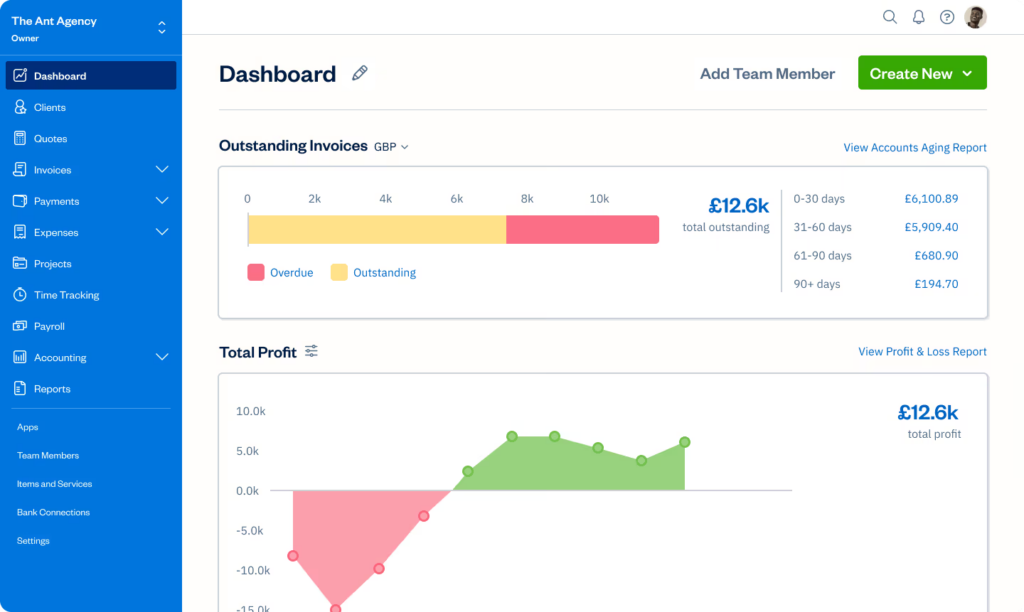
The FreshBooks navigation bar is located on the left-hand side of the interface, and leads to the following workflows:
- Dashboard
- Clients
- Estimates
- Invoices
- Payments
- Expenses
- Projects
- Time-Tracking
- Accounting
- Reports
The platform comes with a search bar that allows you to locate clients, payments, and expenses with ease. It also includes a shortcut to the help center, allowing you to access guides and support quickly.
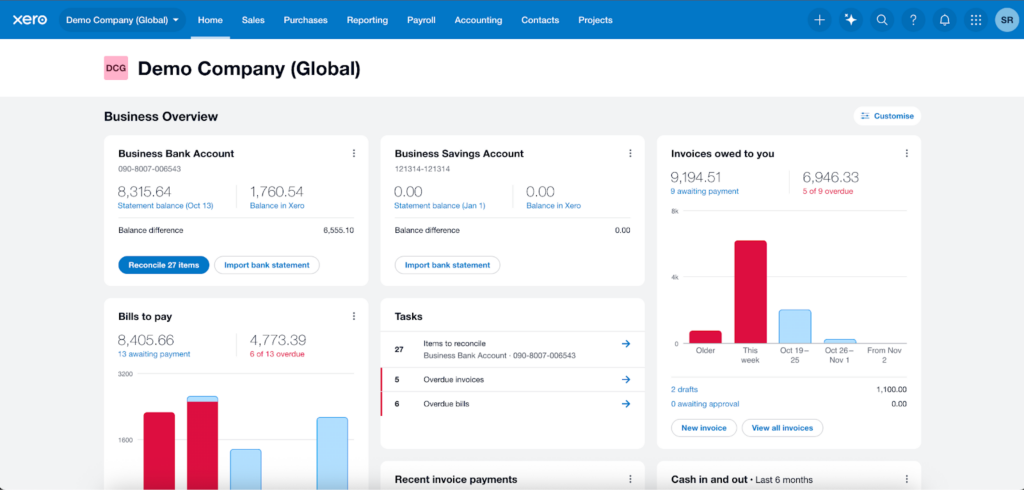
The Xero Interface
In contrast, Xero places its navigation bar at the top of the interface. Buttons on the navigation bar lead to the following:
- Home
- Sales
- Purchases
- Reporting
- Payroll
- Accounting
- Contacts
- Projects
The navigation bar also links out to utility features, such as the search bar, the help center, and an AI-powered support chatbot. These make it easier to locate information, access software guidance, and ask workflow-related questions.
Payments and Invoices
Entry-level FreshBooks plans offer unlimited free invoicing, but limit clients to five per month. Users must upgrade to increase their client limits. This is suitable for freelancers who generate high transaction volumes under a select number of clients.
Meanwhile, entry-level Xero plans only allow 20 invoices per month, which can be limiting for business owners with tight budgets but high transaction volumes. To increase allowances, you must upgrade to a higher-tier account.
Both platforms allow users to monitor invoices by status, so they can quickly identify which invoices have been sent, viewed, paid, or remain overdue. Each also includes a dashboard that highlights outstanding invoices and payment activity at a glance.
Expense Tracking
FreshBooks makes expense tracking easy for freelancers and small teams. Users can log expenses manually, connect to bank feeds, upload receipts, and categorize spending. The platform also supports mileage tracking, which benefits service professionals who travel for work.
Similar to FreshBooks, Xero can also connect bank feeds and capture receipts. However, it also lets employees submit expense claims for review and approval. This feature enables easy logging of employee expenses and gives business owners greater control over spending as teams grow.
Reporting
Because FreshBooks primarily serves freelancers and very small businesses, it only offers basic reporting functionality. Its report library consists of financial statements, invoice and expense reports, payment reports, and time tracking and project reports. The platform limits you to pre-designed reports and lacks customization options.
By contrast, the Xero report library aims to provide the depth that small to mid-sized businesses need. It includes reports for financial performance, financial statements, payables and receivables, payroll, projects, reconciliations, taxes and balances, and transactions. Unlike FreshBooks, it provides the option to create custom reports, letting you show your data the way your business needs.
Dashboards
Both FreshBooks and Xero come with dashboards that translate information into easy-to-digest visualizations. However, FreshBooks offers simpler functionality, only showing overviews of core metrics. These include:
- Outstanding and overdue invoices
- Revenue vs. expenses
- Basic profit trends
Meanwhile, Xero offers broader functionality and greater customization. It lets you choose which metrics and widgets to display and where to place them, so you can highlight the data that matters most.
Available Xero widgets include:
- Recent invoice payments
- Bills to pay
- Tasks
- Invoices owed to you
- Cash in and out
- Profit and loss
- Chart of accounts watchlist
- Expenses to review
- Your expenses
Integrations
Xero offers a wider selection of integrations than FreshBooks. While FreshBooks comes with over 100 built-in connections, Xero comes with over 1,000. Additionally, FreshBooks primarily connects with niche platforms, while Xero connects with widely-used tools, such as Stripe, PayPal, Square, Shopify, WooCommerce, and HubSpot. This allows it to better accommodate the complex workflows of larger businesses.
Mobile App
Both FreshBooks and QuickBooks come in iOS and Android versions, allowing users to run basic bookkeeping tasks on the go. Available tasks include:
| FreshBooks | Xero | |
| View basic activity dashboards | ✅ | ✅ |
| Invoicing | ✅ | ✅ |
| Expense tracking | ✅ | ✅ |
| Mobile receipt capture | ✅ | ✅ |
| Mileage tracking | ✅ | ✅ |
| Time tracking | ✅ | Limited |
| Online payments | ✅ | ✅ |
| Client management | ✅ | ✅ |
| Report generation | ✅ | ✅ |
| Activity alerts | ✅ | Limited |
App Store and Google Play ratings are largely positive for all apps. However, many written reviews expressed negative sentiments.
- Negative FreshBooks reviews claim that the app is often slow and unreliable. Many also add that customer support is difficult to reach and inefficient at responding to issues.
- Negative Xero reviews said that the app interface sacrificed functionality for aesthetic appeal. They claimed that invoices omitted important information to appear cleaner. Other reviewers also said that the app was often glitchy.
However, positive ratings still outnumbered negative ratings. Written reviews primarily skew negative because users with negative experiences are more likely to leave reviews than users with positive experiences.
| App Store Rating | Google Play Rating | |
| FreshBooks | ★★★★ 4.7 out of 5 (based on 11,000+ reviews) | ★★★★ 4.5 out of 5 (based on 5,000+ reviews) |
| Visit App Store | Visit Google Play | |
| Xero | ★★★★ 4.7 out of 5 (based on 400+ reviews) | ★★★★ 4.0 out of 5 (based on 10,000+ reviews) |
| Visit App Store | Visit Google Play |
User Feedback
| Capterra Rating | G2 Rating | |
| FreshBooks | ★★★★ 4.5 out of 5 (based on 4,000+ reviews) | ★★★★ 4.5 out of 5 (based on 900+ reviews) |
| Visit Capterra | Visit G2 | |
| Xero | ★★★★ 4.4 out of 5 (based on 3,000+ reviews) | ★★★★ 4.4 out of 5 (based on 1,000+ reviews) |
| Visit Capterra | Visit G2 |
FreshBooks and Xero both received strong reviews across user review platforms Capterra and G2. Though feedback skewed positive for both platforms, FreshBooks earned more reviews and scored slightly higher overall.
Users consistently praise FreshBooks for its ease of use, especially its invoicing and time-tracking tools. Many reviewers note that the platform helps them save time on routine tasks, including report generation. However, some users complained of limited scalability, with higher-tier plans struggling to support larger or more complex operations. Many users also complained about pricing, saying that the cost outweighs the value at higher tiers.
Meanwhile, feedback for Xero praises its clean interface and intuitive design. Beginners and non-technical users often mention how easy it is to navigate, both on desktop and mobile. Users also appreciate Xero’s accessibility across devices. Meanwhile, many negative reviews focus on customer support, frequently criticizing the limited support channels and slow response times. Like FreshBooks, Xero also draws many pricing complaints, with some users questioning the return on investment.
Customer Support
| FreshBooks | Xero | |
| Phone | ✅ | ❌ |
| Live Chat | ✅ | ❌ |
| ✅ | ✅ | |
| Help Center | ✅ | ✅ |
| Community Forum | ❌ | ✅ |
FreshBooks outperforms Xero in the customer support department. It offers help through email, live chat, and phone, allowing customers to resolve all issues quickly. Xero, in contrast, provides support only by email, making it harder to address urgent concerns promptly.
Xero’s main strength lies in its community forum, where users can exchange tips, answer questions, and share practical solutions that go beyond official guidance. FreshBooks lacks a forum, so you are limited to support from official channels.
However, both platforms provide help centers, enabling users to access guides, tutorials, and FAQs to troubleshoot common issues on their own. These resources make it easier to find answers quickly without waiting for direct support.
Multi-User Support
When it comes to multi-user support, Xero outshines FreshBooks. All plans include unlimited user seats, allowing owners to grow their bookkeeping teams without extra cost. Meanwhile, FreshBooks charges $11 per month per additional user, which can add up as the team scales.
However, FreshBooks’ edge over Xero is the increased granularity of its user permissions. Both FreshBooks and Xero let you assign roles to users, which control what data and functions they can access. FreshBooks offers seven types of user roles, while Xero only offers five. By giving more precise control over access, FreshBooks increases your capacity to protect sensitive data.
When to Choose FreshBooks
Xero is better suited for small- to mid-sized businesses that need more robust accounting features and greater scalability. It works well for companies planning to expand, manage multiple users, and handle more complex financial operations.
You are a freelancer
FreshBooks’ pricing and features best serve freelancers and other service-based businesses. Its entry-level plan, which costs $22, offers unlimited invoicing for a limited number of clients, time-tracking, and mileage tracking. These tools simplify freelancer bookkeeping by automatically converting tracked hours and travel into billable items, reducing manual calculations, and keeping all client billing organized in one place.
You are on a budget
The entry-level plan FreshBooks offers greater value for money than the entry-level Xero plan. It offers unlimited time-tracking, unlimited invoicing (to a limited number of clients), and unlimited invoicing for a lower monthly fee. Meanwhile, the Xero Starter account charges $25, sets strict monthly limits for invoices and bills, and provides no built-in time-tracking or mileage tracking.
You value customer support access
FreshBooks customer support is available by phone, live chat, and email, giving you easy access to timely, real-time help when you need it. Xero, by contrast, offers support only by email, which can make it harder to resolve urgent issues quickly.
When to Choose Xero
While FreshBooks focuses on freelancers, Xero is better suited for small- to mid-sized businesses in need of deeper accounting support. [add one more sentence]
You plan to grow beyond freelance work
FreshBooks primarily caters to smaller, service-based businesses, such as freelancers, contractors, and self-employed individuals. It lacks the depth necessary to support larger organizations. Meanwhile, Xero provides features that accommodate growth, such as the ability to manage multiple users with varied access levels, larger transaction allowance, and detailed financial reporting.
You work with a large bookkeeping team
All FreshBooks plans charge $11 per month per additional user. In contrast, all Xero plans provide unlimited user seats. The platform lets you customize permissions per user to control access levels and protect sensitive data.
You need in-depth reporting
FreshBooks only offers basic reports, such as financial statements, invoices and expense reports, payment reports, and time tracking and project reports. Meanwhile, Xero provides reports for financial performance, financial statements, payables and receivables, payroll, projects, reconciliations, taxes and balances, and transactions. It also lets you create custom reports, increasing your control over data presentation.
When to Choose an Alternative
While FreshBooks and Xero are strong bookkeeping tools, they do not fit every situation. We’ve narrowed down what alternatives to choose and when.
You want a free plan
While FreshBooks and Xero offer affordable starter accounts, very small businesses may still find their monthly fees too steep. The best solution for cost-conscious business owners is Zoho Books, which offers invoicing, expense management, reporting, and more for free. Check out our Zoho Books review for more information.
You want flexibility when choosing accountants and bookkeepers
FreshBooks and Xero are popular alternatives to QuickBooks, but QuickBooks remains the world’s leading accounting solution. Its widespread use means most accounting professionals know how to work with it. If you plan to outsource your bookkeeping, you will have a larger and more accessible pool of QuickBooks experts than Xero or FreshBooks experts. Read our comparison of FreshBooks vs. Xero vs. QuickBooks for a breakdown of all three.
You need industry-specific accounting tools
Xero provides general bookkeeping tools, and FreshBooks is even more streamlined. Both platforms support integrations for industry-specific needs, but neither offers advanced features such as inventory tracking, job costing, or project management. If your business depends on industry-specific tools, you may need to use integrations or select a different solution.
To find the right fit, explore our buyer’s guides to industry-specific bookkeeping software.
- Best Bookkeeping Software for Churches
- Best Bookkeeping Software for Construction Companies
- Best Farm Bookkeeping Software
- Best Bookkeeping Software for Nonprofits
- Best Property Management Bookkeeping Software
- Best Bookkeeping Software for Restaurants
Bottom Line
Choosing between FreshBooks and Xero is a matter of size and scalability. FreshBooks provides great support for service-focused small businesses by offering essential features and reasonable usage limits at an affordable price. Meanwhile, Xero is better for small to mid-sized businesses with more employees and more complex needs. It provides advanced accounting tools, unlimited user access, customizable reports, and extensive integrations to support growth and streamline financial management.
Start Your Bookkeeping Journey with EpicBooks
Partner with EpicBooks to streamline your financial management. Our experienced team handles the day-to-day details of bookkeeping, from revenue tracking and tax preparation to payroll, reporting, budgeting, and forecasting. By removing this work from your plate, we give you more time and clarity to focus on growing your business. Visit our services page to learn more.

Echo Wang is an accomplished Canadian entrepreneur and the driving force behind EpicBooks, bringing a wealth of experience and a passion for excellence to the realm of bookkeeping.
Start your bookkeeping journey with EpicBooks
Revenue tracking, tax preparation, payroll, reporting, budgeting, and forecasting — handled by experts.