
Gusto is an all-in-one human resources (HR) solution that provides access to payroll administration, tax filing, and HR management services. It is suitable for small- to medium-sized American businesses with simple to moderate payroll needs.
Price: $49 per month, $80 per month, and $180 per month
Pros
✅Combines payroll, hiring, onboarding, benefits, and time tracking
✅Unlimited payroll runs
Cons
❌Lacks support for international employees
❌Limited scalability
Gusto is one of the most popular payroll platforms in America. It is especially useful for teams that want payroll, taxes, and employee management in one place. To help you determine whether Gusto is right for your business, we explore its features, pricing, strengths, and weaknesses in depth.
Gusto Interface Overview
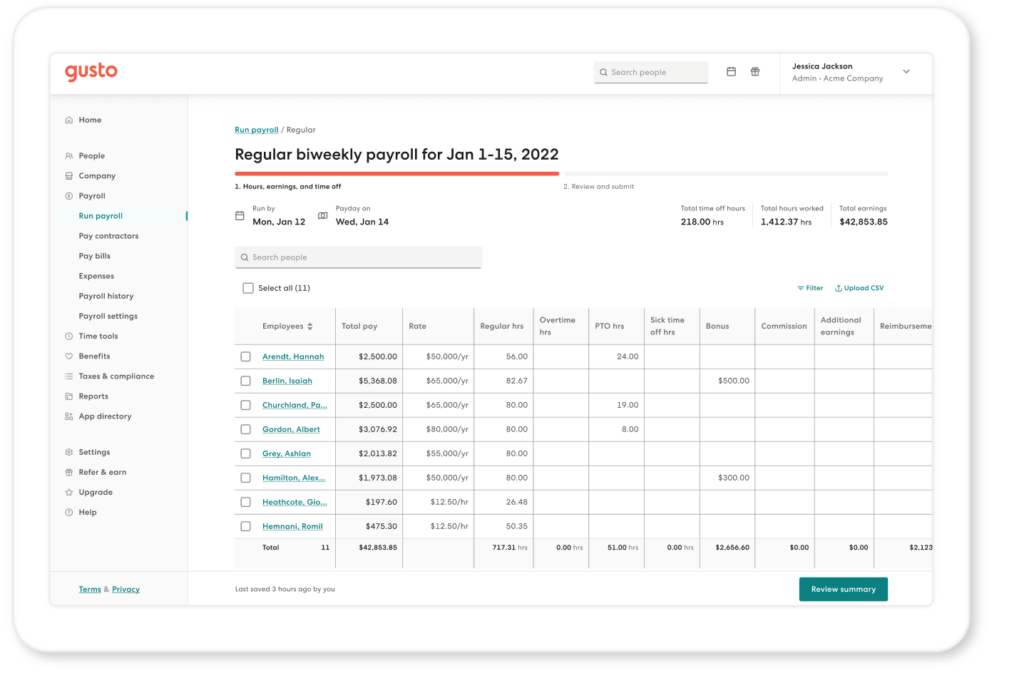
The Gusto interface is extremely straightforward. It consists of two main navigation bars: a sidebar linking out to primary HR workflows and a utility bar on top for supporting actions.
The sidebar consists of the following:
- People: Gusto’s People tab functions as a central hub for employee and contractor information, enabling you to view profiles, update personal details, track compensation, and manage roles in one place. It keeps your team organized and ensures that all records are up-to-date and easy to access.
- Company: The Company section stores key information about your business. It allows you to manage details like your company address, industry information, and linked bank accounts. You can also set company-wide policies, which helps maintain consistency across your team.
- Payroll: The Payroll tab is where you run and manage employee payments. The platform automatically calculates wages, taxes, and deductions, enabling faster payroll processing. It also provides access to past payroll runs for easy reference.
- Time tools: Gusto’s time tools help you track hours worked and manage time off. Employees can log their hours and request leave, while managers can review and approve entries. Logged hours sync directly into payroll, reducing manual input and improving accuracy.
- Benefits: The Benefits section lets you manage employee perks such as health insurance and retirement plans. It allows you to set up offerings, track enrollments, and monitor deductions. This helps you support your employees without needing additional benefit management platforms.
- Taxes and compliance: This tab handles your tax responsibilities and compliance tasks. The platform automates payroll tax filing and keeps records organized for easy access. It also updates based on current regulations, which helps reduce the risk of errors or penalties.
- Reports: The Reports section translates payroll and workforce data into easy-to-understand summaries. It lets you generate reports on wages, taxes, and employee trends. With these insights, you can track business performance and make decisions more effectively.
Outside the main workflows, it also lets you access:
- App directory: The App directory connects Gusto with useful third-party integrations. It provides connections to many popular business tools, apps for accounting, time tracking, and more. This helps you build a workflow that matches your business needs.
- Settings: The Settings tab lets you control how your account operates. You can update permissions, configure payroll preferences, and manage notifications. This customization ensures the platform works the way your business works.
- Refer and earn: This section lets you invite other businesses to use Gusto. When someone signs up through your referral, you can earn rewards like cash incentives and gift cards.
- Upgrade: Gusto’s Upgrade tab shows other available plan options and feature expansions, giving you a quick way to review what each tier offers. This makes it easy to expand the solution according to your needs.
- Help: The Help section gives you access to support and resources. You can find guides, FAQs, and contact options for customer support. This ensures you can resolve issues quickly and continue managing your business without delays.
Meanwhile, the utility bar contains quick-access tools that help you manage tasks and stay informed. These include:
- Search Bar: Gusto’s search bar helps you quickly find important information, such as employees, payroll records, reports, or settings, in seconds.
- Notifications: The notifications icon shows quick updates on important tasks and system alerts. The platform uses this space to highlight pending approvals, payroll deadlines, and compliance reminders, helping you stay on top of responsibilities.
- Profile and account settings: This section gives you control over your personal and account-level preferences. You can update your profile details, manage login settings, and switch between accounts if needed.
Does Gusto Have a Mobile App?
The Gusto Mobile app is available on iOS and Android, with separate versions for employers and employees. Each lets you manage payroll tasks on the go.
The employer version lets you perform the following tasks:
- Payroll: Run regular or off-cycle payroll.
- Time tracking: Review and approve shifts and time off.
- Team management: View and manage important team information.
- Onboarding: Add and onboard new employees.
- Notifications: Set up notifications and permissions.
Meanwhile, employees can use the app to do the following:
- Paycheck management: Manage income and transfer money to different bank accounts/
- Early pay: Access payday advances.
- Benefits management: Manage benefits or sign up for special offers.
- Documents: Access and sign employee documents.
- Time: Track hours and request time off.
The app scored well among users, earning 4.8 stars on the App Store (based on 40,000+ reviews) and 4.4 stars on Google Play (based on 17,000+ reviews). However, few written reviews are available online.
Gusto Key Features
Gusto provides all key HR workflows, including payroll, taxes, hiring, onboarding, benefits, and time-tracking. Combining these tools in one platform simplifies calculations and reduces manual work, which helps improve accuracy and efficiency across your operations.
Payroll Administration
Gusto provides simple and reliable payroll services. The system automatically calculates wages, overtime, and deductions, which lets you run payroll in minutes. It can handle different pay schedules, track changes in employee status, and automate recurring payroll runs. This lets you handle moderately complex compensation structures with ease and efficiency.
The platform also supports direct deposit, which ensures that employees get paid on time without extra work from you. The system provides built-in reports, giving you a quick view of payroll costs and trends to support effective planning and informed decision-making.
Tax Filing and Compliance
Gusto takes the stress out of tax filing by calculating and filing federal, state, and local payroll taxes on your behalf. The system automatically tracks deadlines and fills complex forms, reducing manual work on the user’s end. This ensures compliance and reduces the risk of penalties or fines.
The platform also stays up to date with changing tax laws, sparing you from needing to monitor new rules and guidelines. It files W-2s and 1099s at the end of the year, then sends copies to your employees and contractors. These documents get saved into the system, granting you easy access to all important records.
Hiring and Onboarding
Gusto streamlines the entire hiring and onboarding process. It lets you send offer letters, collect employee or contractor signatures, and gather new hire information in one place. This keeps new data organized and creates a smooth experience for both you and your new employees.
The system also supports candidates through the onboarding process. Once they accept the offer, Gusto guides them through each step of the onboarding process, including filling out forms, setting up direct deposit, and reviewing company policies. This reduces paperwork and helps new hires get up to speed quickly, ensuring efficiency as they transition into the company.
Benefits Administration
Gusto helps you manage employee benefits with ease. You can offer health insurance, retirement plans, and other perks through a single platform. The system keeps track of enrollments and deductions, sparing you from the burden of managing multiple providers or spreadsheets.
Employees can review and select their benefits during open enrollment without confusion. Gusto presents options clearly, which helps employees make informed choices. The clarity improves satisfaction and reduces the time spent answering routine questions about coverage.
Time-Tracking
Gusto includes time-tracking tools that fit into your workflow. Employees can log hours, track overtime, and request time off in one system. This ensures accurate records and simplifies payroll processing since hours flow directly into payroll.
The system allows managers to review and approve timesheets quickly. It automatically flags inconsistencies, helping you catch errors before they impact employee paychecks. It also provides clear records of hours worked, allowing you to analyze productivity and manage labor costs more effectively.
HR Tools and Insights
Gusto offers HR tools that support your team as it grows. You can store employee records, manage documents, and track performance in one place. This keeps information organized and easy to access when you need it.
The platform also provides insights that help you make better decisions. You can review reports on turnover, compensation, and team growth. These insights give you a clear picture of your workforce and help you plan for the future with confidence.
Employee Self-Review
Gusto encourages employees to take part in their own development through self-review tools. Team members can reflect on their work, set goals, and share feedback. This builds a sense of ownership and promotes open communication.
Managers can use employee self-review insights to guide meaningful conversations. These reviews provide context for performance discussions, helping teams identify areas for growth. As a result, performance reviews become more productive, supporting company-wide improvement.
Customer Support
Gusto provides customer support through chat, phone, and email, but prioritizes chat. They claim to resolve chat concerns nine times faster than email concerns.
Hours differ depending on your chosen communication channel. Chat and email support are available every day, but phone support is only available on weekdays. The company routes all after-hours calls to voice AI.
| Contact method | Hours (Pacific Standard Time) | Days |
|---|---|---|
| Chat | 5:00 AM to 5:00 PM 5:00 AM to 3:00 PM | Monday to Friday Saturday to Sunday |
| Phone | 5:00 AM to 5:00 PM | Monday to Friday |
| Outside support hours | Monday to Sunday |
Premium users get priority customer support. You can also buy priority customer support as an add-on to any type of Gusto plan.
However, reviews for Gusto customer support are predominantly negative. The company scored an average of 2.4 stars (based on 2,000+ reviews) on customer support review platform Trustpilot. Common complaints include:
- Slow resolution times
- Erroneous responses
- Rude or condescending staff
- Difficulty reaching humans
Note that customers with unsatisfactory experiences are more likely to leave reviews than customers with positive or neutral experiences. This bias often skews overall ratings and can give a less balanced view of service quality.
Gusto Pricing Plans
| Solo | Simple | Plus | Premium |
| $49 per month | $49 per month | $80 per month | $180 per month |
| – Compliant self-pay – Automatic tax filing – Reasonable salary calculator – S Corp election and compliance – Solo 401k – Bill pay and invoicing | – Single-state payroll – Unlimited monthly payroll – Tax filings – Employee app – Domestic contractor payments | – All Simple features – Multi-state payroll – Time tracking – Scheduling – Expenses and reimbursements – Workforce cost reports – Custom time off and holiday policies – Talent acquisition | – All Plus features – Priority support – Dedicated service advisor – Performance and compensation management – Custom reports |
Gusto primarily caters to solopreneurs and small- to medium-sized businesses. It offers four types of plans tailored to businesses within this range of sizes.
The great thing about Gusto is that it is flexible with pricing. If you would rather not shoulder the cost of a full upgrade, you can buy specific features as add-ons. Examples of available add-ons include priority support, time-tracking, scheduling, and workers’ compensation.
Solo
Gusto’s Solo plan is designed to support freelancers or business owners with no employees. It allows you to pay yourself, automate tax calculations and filings, and generate simple reports. It also includes contractor payments in case you work with other freelancers.
The Gusto Solo plan is great for freelancers, contractors, self-employed individuals, and solo business owners who need reliable self-payment tools. Naturally, it is not suitable for businesses that plan to hire more employees or need benefits administration, advanced HR tools, or multiple employee profiles.
Simple
Businesses with employees should start with the Simple plan. This tier includes basic payroll services, tax-filing, employee self-service tools, and basic reports. It lets employees access pay stubs and manage their own information, which reduces admin work. The plan also supports direct deposit, ensuring timely payments.
Gusto’s Simple plan is suitable for small businesses with a handful of employees and straightforward HR needs. It works well for teams that want reliable payroll and light HR support at an accessible price point. However, it may not suffice for companies that want integrated benefits, advanced compliance tools, or deeper insights into workforce data.
Plus
Upgrading to Gusto Plus gives you access to features that support growing teams. These include time tracking, paid time off management, and expanded onboarding tools. The plan also provides access to benefits administration and deeper reporting, which helps you manage a larger workforce with reduced manual effort.
Gusto Plus suits small to medium-sized businesses that want to centralize HR and payroll tasks and improve efficiency across teams. However, its lack of advanced customization, priority support, and complex compliance management makes it unsuitable for larger organizations.
Premium
The Gusto Premium plan offers a more comprehensive HR and payroll solution suitable for fast-growing businesses. It provides access to certified HR experts, compliance alerts, and enhanced support. It also includes advanced tools for performance management and deeper insights into workforce trends, which help businesses handle more complex HR responsibilities with efficiency.
Gusto Premium is a good choice for businesses that need hands-on support, expert guidance, and stronger compliance coverage. However, it may be too costly for budget-conscious small businesses that do not need advanced features.
When to Choose Gusto
Gusto is a serviceable solution for growing businesses with straightforward to moderately complex HR and payroll needs.
You have simple to moderate payroll needs
Gusto works best when your payroll needs stay straightforward. If you pay employees on a regular schedule and do not deal with overly complex compensation structures, its features can accommodate you perfectly. Features like automated deductions, calculations, and filings make it a strong choice for small teams.
You run a multi-state team
Managing employees across different states can create challenges with taxes and compliance. Fortunately, Gusto can calculate the correct taxes and file them appropriately according to each employee’s location. The platform stays up-to-date on changes in state requirements, which helps save time and reduce errors. You can expand your team without worrying about manually tracking rules across states.
You work with both contractors and employees
Gusto is a great choice for businesses that rely on a mix of full-time employees and independent contractors. It lets you pay contractors, track payments, and generate the correct tax forms alongside regular payroll. It separates classifications to keep payments accurate and organized while still providing a unified view of your workforce. This helps you stay compliant without juggling multiple tools.
When to Choose an Alternative
Although Gusto can meet the needs of most small- to medium-sized businesses, there are a handful of situations that it cannot accommodate. Below, we discuss common scenarios where another solution may offer a better fit.
You’re on a budget
Gusto plans start at $49, which some businesses may find costly. Plans also get costlier as your needs expand. A cheaper alternative would be Patriot Payroll, which charges $17 per month with an additional $4 per user per month and includes unlimited payrolls, free direct deposit, automated payroll, and a free employee portal.
You run a larger business
Gusto works well for small to mid-sized teams, but lacks the advanced features and customization large organizations need. If you manage complex workflows, multiple departments, or detailed reporting needs, Gusto may not suffice. The best alternative is ADP Workforce Now, which provides robust tools for scaling businesses, including deeper analytics, compliance support, and flexible integrations.
You work with many international employees
Gusto focuses on U.S.-based payroll and compliance, which can limit its usefulness if you hire globally. It lacks support for multiple currencies, local tax laws, and regional compliance, making it unsuitable for businesses with international employees or contractors. Deel is a great alternative because it allows you to pay in multiple currencies, stay compliant with local regulations, and set approvals, controls, and roles by region.
Gusto vs. Competitors
| Gusto | ADP | Rippling | QuickBooks Payroll | |
|---|---|---|---|---|
| Starting Price | $49 per month | Custom quote only | $8 per user per month + payroll module fees | $88 (with QuickBooks Simple Start) |
| G2 Rating | ★★★★ 4.6 out of 5 (based on 8,000+ reviews) | ★★★★ 4.4 out of 5 (based on 10,000+ reviews) | ★★★★ 4.8 out of 5 (based on 14,000+ reviews) | ★★★★ 4.4 out of 5 (based on 400+ reviews) |
What Users Are Saying
| Capterra Rating | G2 Rating |
|---|---|
| ★★★★ 4.6 out of 5 (based on 8,000+ reviews) | ★★★★ 4.6 out of 5 (based on 8,000+ reviews) |
| Visit Capterra | Visit G2 |
Gusto earned positive ratings on user review platforms Capterra and G2. Users praise the platform for its ease of use, clean interface, and reliable payroll automation. Many also claim that its features simplify tax filing and enjoy the reduced time spent on routine administrative tasks.
However, as we mentioned in our earlier section on customer support, many reviewers say that Gusto’s customer support leaves much to be desired. These complaints reported slow response times, unhelpful answers, and difficulty resolving problems. Negative reviews outside customer service noted payroll issues, such as delayed direct deposits, incorrect calculations, or unexpected tax problems.
Bottom Line
Gusto is a reliable, easy-to-use platform for small to mid-sized businesses that want to simplify payroll and basic HR tasks. It provides useful automated features, a clean interface, and solid compliance support, which makes day-to-day HR operations more manageable. Although it may not offer the depth or flexibility that larger organizations need, it provides decent value for teams that prioritize ease of use and efficiency.
Simplify Payroll Management with EpicBooks
If you want to streamline payroll management, partner with EpicBooks. Our experts handle routine payroll administration tasks, including calculating employee salaries, managing deductions, processing payroll taxes, and generating pay stubs so you can run your business with efficiency and confidence.
For more information, read our services page.

Echo Wang is an accomplished Canadian entrepreneur and the driving force behind EpicBooks, bringing a wealth of experience and a passion for excellence to the realm of bookkeeping.
Simplify payroll management with EpicBooks
We handle salary calculations, deductions, payroll taxes, and pay stubs so you can run your business with confidence.